Compare commits
| Author | SHA1 | Date | |
|---|---|---|---|
 gfdgd-xi gfdgd-xi
|
9799b598c3 | ||
|
gfdgd-xi
|
2933fc90df | ||
|
gfdgd-xi
|
4a4a75eacd | ||
|
gfdgd-xi
|
42516f874a | ||
|
gfdgd-xi
|
c4b977c31c | ||
|
gfdgd-xi
|
df6d4ef120 | ||
|
gfdgd-xi
|
8e9489b7f7 | ||
|
gfdgd-xi
|
b6d435def7 | ||
|
gfdgd-xi
|
60c3920f1f | ||
|
gfdgd-xi
|
f9f163b973 | ||
|
gfdgd-xi
|
1b30fd4a6c | ||
|
gfdgd-xi
|
0b27387d08 | ||
|
gfdgd-xi
|
0bcc1dfc18 | ||
|
gfdgd-xi
|
c4a0fcfa6e |
@@ -0,0 +1,73 @@
|
||||
# This file is used to ignore files which are generated
|
||||
# ----------------------------------------------------------------------------
|
||||
|
||||
*~
|
||||
*.autosave
|
||||
*.a
|
||||
*.core
|
||||
*.moc
|
||||
*.o
|
||||
*.obj
|
||||
*.orig
|
||||
*.rej
|
||||
*.so
|
||||
*.so.*
|
||||
*_pch.h.cpp
|
||||
*_resource.rc
|
||||
*.qm
|
||||
.#*
|
||||
*.*#
|
||||
core
|
||||
!core/
|
||||
tags
|
||||
.DS_Store
|
||||
.directory
|
||||
*.debug
|
||||
Makefile*
|
||||
*.prl
|
||||
*.app
|
||||
moc_*.cpp
|
||||
ui_*.h
|
||||
qrc_*.cpp
|
||||
Thumbs.db
|
||||
*.res
|
||||
*.rc
|
||||
/.qmake.cache
|
||||
/.qmake.stash
|
||||
|
||||
# qtcreator generated files
|
||||
*.pro.user*
|
||||
|
||||
# xemacs temporary files
|
||||
*.flc
|
||||
|
||||
# Vim temporary files
|
||||
.*.swp
|
||||
|
||||
# Visual Studio generated files
|
||||
*.ib_pdb_index
|
||||
*.idb
|
||||
*.ilk
|
||||
*.pdb
|
||||
*.sln
|
||||
*.suo
|
||||
*.vcproj
|
||||
*vcproj.*.*.user
|
||||
*.ncb
|
||||
*.sdf
|
||||
*.opensdf
|
||||
*.vcxproj
|
||||
*vcxproj.*
|
||||
|
||||
# MinGW generated files
|
||||
*.Debug
|
||||
*.Release
|
||||
|
||||
# Python byte code
|
||||
*.pyc
|
||||
|
||||
# Binaries
|
||||
# --------
|
||||
*.dll
|
||||
*.exe
|
||||
|
||||
@@ -1,5 +0,0 @@
|
||||
#!/usr/bin/env python3
|
||||
import sys
|
||||
import base64
|
||||
import requests
|
||||
print(requests.get(base64.b64decode("aHR0cDovLzEyMC4yNS4xNTMuMTQ0L3NwYXJrLWRlZXBpbi13aW5lLXJ1bm5lci9JbnN0YWxsLnBocD9WZXJzaW9uPQ==").decode("utf-8") + sys.argv[1]).text)
|
||||

|
After Width: | Height: | Size: 22 KiB |

|
After Width: | Height: | Size: 62 KiB |

|
After Width: | Height: | Size: 67 KiB |

|
After Width: | Height: | Size: 75 KiB |

|
After Width: | Height: | Size: 75 KiB |

|
After Width: | Height: | Size: 126 KiB |

|
After Width: | Height: | Size: 270 KiB |

|
After Width: | Height: | Size: 66 KiB |

|
After Width: | Height: | Size: 76 KiB |
@@ -1,8 +0,0 @@
|
||||
[
|
||||
[
|
||||
|
||||
],
|
||||
[
|
||||
|
||||
]
|
||||
]
|
||||
@@ -1,132 +0,0 @@
|
||||
build:
|
||||
#cd VM-source && qmake
|
||||
#cd VM-source && make
|
||||
#cd wine && make
|
||||
cp -rv helperset deb/opt/apps/deepin-wine-runner/
|
||||
cp -rv VM-source/VirtualMachine VM
|
||||
cp -rv VM-source/deepin-wine-runner.svg VM
|
||||
cp -rv VM-source/api VM
|
||||
cp -rv VM-source/Windows7X64Auto.iso VM
|
||||
cp -rv VM-source/Windows7X86Auto.iso VM
|
||||
cp -rv VM-source/run.py VM
|
||||
cp -rv wine/ deb/opt/apps/deepin-wine-runner/
|
||||
cp -rv Test/ deb/opt/apps/deepin-wine-runner/
|
||||
zip -v -q -r package-script.zip package-script
|
||||
cp -rv VM deb/opt/apps/deepin-wine-runner
|
||||
cp -rv Download.py deb/opt/apps/deepin-wine-runner/
|
||||
cp -rv AllInstall.py deb/opt/apps/deepin-wine-runner
|
||||
cp -rv ShellList deb/opt/apps/deepin-wine-runner
|
||||
cp -rv QemuDownload.py deb/opt/apps/deepin-wine-runner
|
||||
cp -rv QemuRun.py deb/opt/apps/deepin-wine-runner
|
||||
cp -rv kill.sh deb/opt/apps/deepin-wine-runner
|
||||
cp -rv InstallWineOnDeepin23Alpha.py deb/opt/apps/deepin-wine-runner
|
||||
cp -rv wrestool deb/opt/apps/deepin-wine-runner
|
||||
cp -rv Mount.sh deb/opt/apps/deepin-wine-runner
|
||||
cp -rv UnMount.sh deb/opt/apps/deepin-wine-runner
|
||||
cp -rv vkd3d-proton.7z deb/opt/apps/deepin-wine-runner
|
||||
cp -rv deepin-wine-easy-packager.py deb/opt/apps/deepin-wine-runner
|
||||
cp -rv IconList.json deb/opt/apps/deepin-wine-runner
|
||||
cp -rv GetEXEVersion.exe deb/opt/apps/deepin-wine-runner
|
||||
cp -rv MountWithoutHome.sh deb/opt/apps/deepin-wine-runner
|
||||
echo "[]" > deb/opt/apps/deepin-wine-runner/wine/winelist.json
|
||||
rm -rfv deb/opt/apps/deepin-wine-runner/wine/winelist.json
|
||||
cp -rv req deb/opt/apps/deepin-wine-runner
|
||||
cp -rv BuildDesktop.py deb/opt/apps/deepin-wine-runner
|
||||
cp -rv ChangePassword.sh deb/opt/apps/deepin-wine-runner
|
||||
cp -rv trans deb/opt/apps/deepin-wine-runner
|
||||
cp -rv RegShot deb/opt/apps/deepin-wine-runner
|
||||
cp -rv BeCyIconGrabber.exe deb/opt/apps/deepin-wine-runner
|
||||
cp -rv AutoShell deb/opt/apps/deepin-wine-runner
|
||||
cp -rv deepin-wine-packager-with-script.py deb/opt/apps/deepin-wine-runner
|
||||
cp -rv deepin-wine-packager.py deb/opt/apps/deepin-wine-runner
|
||||
cp -rv deepin-wine-runner-update-bug deb/opt/apps/deepin-wine-runner
|
||||
cp -rv deepin-wine-runner.svg deb/opt/apps/deepin-wine-runner
|
||||
cp -rv deepin-wine-venturi-setter.py deb/opt/apps/deepin-wine-runner
|
||||
cp -rv InstallVisualBasicRuntime.py deb/opt/apps/deepin-wine-runner
|
||||
cp -rv DisabledOpengl.reg deb/opt/apps/deepin-wine-runner
|
||||
cp -rv EnabledOpengl.reg deb/opt/apps/deepin-wine-runner
|
||||
cp -rv geek.exe deb/opt/apps/deepin-wine-runner
|
||||
cp -rv uengineapi deb/opt/apps/deepin-wine-runner
|
||||
cp -rv getxmlimg.py deb/opt/apps/deepin-wine-runner
|
||||
cp -rv ProgramFen.py deb/opt/apps/deepin-wine-runner
|
||||
cp -rv information.json deb/opt/apps/deepin-wine-runner
|
||||
cp -rv InstallMono.py deb/opt/apps/deepin-wine-runner
|
||||
cp -rv InstallMsxml.py deb/opt/apps/deepin-wine-runner
|
||||
cp -rv InstallNetFramework.py deb/opt/apps/deepin-wine-runner
|
||||
cp -rv InstallOther.py deb/opt/apps/deepin-wine-runner
|
||||
cp -rv InstallVisualCPlusPlus.py deb/opt/apps/deepin-wine-runner
|
||||
cp -rv launch.sh deb/opt/apps/deepin-wine-runner
|
||||
cp -rv LICENSE deb/opt/apps/deepin-wine-runner
|
||||
cp -rv mainwindow.py deb/opt/apps/deepin-wine-runner/deepin-wine-runner
|
||||
cp -rv package-script.zip deb/opt/apps/deepin-wine-runner
|
||||
cp -rv Run.bat deb/opt/apps/deepin-wine-runner
|
||||
cp -rv RunVM.sh deb/opt/apps/deepin-wine-runner
|
||||
cp -rv "wine install" deb/opt/apps/deepin-wine-runner
|
||||
cp -rv 窗体透明度设置工具.exe deb/opt/apps/deepin-wine-runner
|
||||
cp -rv UpdateGeek.sh deb/opt/apps/deepin-wine-runner
|
||||
cp -rv AppStore.py deb/opt/apps/deepin-wine-runner
|
||||
cp -rv InstallWineOnDeepin23.py deb/opt/apps/deepin-wine-runner
|
||||
cp -rv dxvk.7z deb/opt/apps/deepin-wine-runner
|
||||
cp -rv InstallFont.py deb/opt/apps/deepin-wine-runner
|
||||
cp -rv CheckDLL deb/opt/apps/deepin-wine-runner
|
||||
#cp -rv exagear.7z deb/opt/apps/deepin-wine-runner
|
||||
cp -rv dlls-arm.7z deb/opt/apps/deepin-wine-runner
|
||||
cp -rv deepin.list deb/opt/apps/deepin-wine-runner
|
||||
cp -rv sparkstore.list deb/opt/apps/deepin-wine-runner
|
||||
cp -rv arm-package.7z deb/opt/apps/deepin-wine-runner
|
||||
#cp -rv exa.7z deb/opt/apps/deepin-wine-runner
|
||||
cp -rv clean-unuse-program.py deb/opt/apps/deepin-wine-runner
|
||||
cp -rv InstallNewWineHQ.sh deb/opt/apps/deepin-wine-runner
|
||||
cp -rv cleanbottle.sh deb/opt/apps/deepin-wine-runner
|
||||
cp -rv StartVM.sh deb/opt/apps/deepin-wine-runner
|
||||
#cp -rv deepin-wine-runner-create-botton.py deb/opt/apps/deepin-wine-runner
|
||||
cp -rv Icon deb/opt/apps/deepin-wine-runner
|
||||
cp -rv ConfigLanguareRunner-help.json deb/opt/apps/deepin-wine-runner
|
||||
cp -rv gtkGetFileNameDlg deb/opt/apps/deepin-wine-runner
|
||||
cp -rv LANG/*.qm deb/opt/apps/deepin-wine-runner/LANG
|
||||
cp -rv InstallDll.py deb/opt/apps/deepin-wine-runner/LANG
|
||||
cp -rv ConfigLanguareRunner.py deb/opt/apps/deepin-wine-runner
|
||||
cp -rv AutoConfig.py deb/opt/apps/deepin-wine-runner
|
||||
cp -rv UI deb/opt/apps/deepin-wine-runner/
|
||||
cp -rv InstallDll.py deb/opt/apps/deepin-wine-runner
|
||||
cp -rv Model deb/opt/apps/deepin-wine-runner
|
||||
cp -rv API deb/opt/apps/deepin-wine-runner
|
||||
cp -rv key deb/opt/apps/deepin-wine-runner
|
||||
python3 RemovePycacheFile.py
|
||||
ln -s /opt/apps/deepin-wine-runner/deepin-wine-packager.py /tmp/spark-deepin-wine-runner-builder/usr/bin/deepin-wine-package-builder
|
||||
ln -s /opt/apps/deepin-wine-runner/deepin-wine-easy-packager.py /tmp/spark-deepin-wine-runner-builder/usr/bin/deepin-wine-packager-easy-builder
|
||||
ln -s /opt/apps/deepin-wine-runner/deepin-wine-packager-with-script.py /tmp/spark-deepin-wine-runner-builder/usr/bin/deepin-wine-packager-with-script
|
||||
ln -s /opt/apps/deepin-wine-runner/deepin-wine-runner /tmp/spark-deepin-wine-runner-builder/usr/bin/deepin-wine-runner
|
||||
ln -s /opt/apps/deepin-wine-runner/AppStore.py /tmp/spark-deepin-wine-runner-builder/usr/bin/deepin-wine-runner-appstore
|
||||
ln -s /opt/apps/deepin-wine-runner/AutoShell/main.py /tmp/spark-deepin-wine-runner-builder/usr/bin/deepin-wine-runner-auto-install-bash
|
||||
ln -s /opt/apps/deepin-wine-runner/ConfigLanguareRunner.py /tmp/spark-deepin-wine-runner-builder/usr/bin/deepin-wine-runner-auto-install-config-old
|
||||
ln -s /opt/apps/deepin-wine-runner/AutoConfig.py /tmp/spark-deepin-wine-runner-builder/usr/bin/deepin-wine-runner-auto-install-gui
|
||||
ln -s /opt/apps/deepin-wine-runner/launch.sh /tmp/spark-deepin-wine-runner-builder/usr/bin/deepin-wine-runner-dtk-launch
|
||||
ln -s /opt/apps/deepin-wine-runner/deepin-wine-runner-update-bug /tmp/spark-deepin-wine-runner-builder/usr/bin/deepin-wine-runner-update-bug
|
||||
ln -s /opt/apps/deepin-wine-runner/InstallFont.py /tmp/spark-deepin-wine-runner-builder/usr/bin/deepin-wine-runner-wine-font-installer
|
||||
ln -s /opt/apps/deepin-wine-runner/InstallNewWineHQ.sh /tmp/spark-deepin-wine-runner-builder/usr/bin/deepin-wine-runner-winehq-install
|
||||
ln -s '/opt/apps/deepin-wine-runner/wine install' /tmp/spark-deepin-wine-runner-builder/usr/bin/deepin-wine-runner-wine-install
|
||||
ln -s '/opt/apps/deepin-wine-runner/wine install' /tmp/spark-deepin-wine-runner-builder/usr/bin/deepin-wine-runner-wine-installer
|
||||
ln -s /opt/apps/deepin-wine-runner/InstallWineOnDeepin23.py /tmp/spark-deepin-wine-runner-builder/usr/bin/deepin-wine-runner-wine-install-deepin23
|
||||
ln -s /opt/apps/deepin-wine-runner/InstallMono.py /tmp/spark-deepin-wine-runner-builder/usr/bin/deepin-wine-runner-wine-monogecko-installer
|
||||
ln -s /opt/apps/deepin-wine-runner/InstallNetFramework.py /tmp/spark-deepin-wine-runner-builder/usr/bin/deepin-wine-runner-wine-netframework-installer
|
||||
ln -s /opt/apps/deepin-wine-runner/InstallVisualCPlusPlus.py /tmp/spark-deepin-wine-runner-builder/usr/bin/deepin-wine-runner-wine-vscppruntime-installer
|
||||
ln -s /opt/apps/deepin-wine-runner/deepin-wine-venturi-setter.py /tmp/spark-deepin-wine-runner-builder/usr/bin/deepin-wine-venturi-setter
|
||||
cp -rv deb /tmp/spark-deepin-wine-runner-builder
|
||||
sudo chown -R root:root /tmp/spark-deepin-wine-runner-builder
|
||||
|
||||
dpkg -b /tmp/spark-deepin-wine-runner-builder spark-deepin-wine-runner.deb
|
||||
sudo rm -rfv /tmp/spark-deepin-wine-runner-builder
|
||||
|
||||
|
||||
install:
|
||||
make build
|
||||
sudo apt update
|
||||
#sudo dpkg -i spark-deepin-wine-runner.deb
|
||||
sudo apt reinstall ./spark-deepin-wine-runner.deb -y --allow-downgrades
|
||||
|
||||
remove:
|
||||
sudo apt purge spark-deepin-wine-runner
|
||||
|
||||
run:
|
||||
python3 mainwindow.py
|
||||
@@ -1,37 +0,0 @@
|
||||
import os
|
||||
import sys
|
||||
import PyQt5.QtWidgets as QtWidgets
|
||||
def OpenTerminal(command):
|
||||
if terminalEnd[terminal][1]:
|
||||
os.system(f"\"{terminal}\" \"{terminalEnd[terminal][0]}\" \"{command}\"")
|
||||
return
|
||||
os.system(f"\"{terminal}\" \"{terminalEnd[terminal][0]}\" {command}")
|
||||
programPath = os.path.split(os.path.realpath(__file__))[0] # 返回 string
|
||||
# 对终端的获取
|
||||
# 为什么 openkylin 只有 mate-terminal
|
||||
# 优先为深度终端
|
||||
terminal = ""
|
||||
terminalList = [
|
||||
"deepin-terminal",
|
||||
"mate-terminal",
|
||||
"gnome-terminal",
|
||||
"xfce4-terminal"
|
||||
]
|
||||
terminalEnd = {
|
||||
f"{programPath}/../launch.sh\" \"deepin-terminal": ["-e", 0],
|
||||
"mate-terminal": ["-e", 1],
|
||||
"gnome-terminal": ["--", 0],
|
||||
"xfce4-terminal": ["-e", 1]
|
||||
}
|
||||
for i in terminalList:
|
||||
if not os.system(f"which {i}"):
|
||||
if i == "deepin-terminal":
|
||||
i = f"{programPath}/../launch.sh\" \"deepin-terminal"
|
||||
terminal = i
|
||||
break
|
||||
if terminal == "":
|
||||
print("无法识别到以下的任意一个终端")
|
||||
print(" ".join(terminalList))
|
||||
app = QtWidgets.QApplication(sys.argv)
|
||||
QtWidgets.QMessageBox.critical(None, "错误", "无法识别到以下的任意一个终端\n" + " ".join(terminalList))
|
||||
exit()
|
||||
@@ -1,512 +1,31 @@
|
||||
<p width=100px align="center"><img src="https://storage.deepin.org/thread/202208031419283599_deepin-wine-runner.png"></p>
|
||||
<h1 align="center">Wine 运行器 3.1.0</h1>
|
||||
<h1 align="center">Wine 运行器 C++ 版</h1>
|
||||
<hr>
|
||||
<a href='https://gitee.com/gfdgd-xi/deep-wine-runner/stargazers'><img src='https://gitee.com/gfdgd-xi/deep-wine-runner/badge/star.svg?theme=dark' alt='star'></img></a>
|
||||
<a href='https://gitee.com/gfdgd-xi/deep-wine-runner/members'><img src='https://gitee.com/gfdgd-xi/deep-wine-runner/badge/fork.svg?theme=dark' alt='fork'></img></a>
|
||||
|
||||
## 介绍
|
||||
Wine运行器是一个能让Linux用户更加方便地运行Windows应用的程序,内置了对Wine图形化的支持、各种Wine工具、自制的Wine程序打包器和运行库安装工具等。
|
||||
它同时还内置了基于VirtualBox制作的、专供小白使用的Windows虚拟机安装工具,可以做到只需下载系统镜像并点击安装即可,无需考虑虚拟机的安装、创建、分区等操作。
|
||||
此外,它还简化了如下命令,让你可以更简便地使用Wine:
|
||||
Wine运行器是一个能让Linux用户更加方便地运行Windows应用的程序。原版的 Wine 只能使用命令操作,且安装过程较为繁琐,对小白不友好。于是该运行器为了解决该痛点,内置了对Wine图形化的支持、Wine 安装器、微型应用商店、各种Wine工具、自制的Wine程序打包器、运行库安装工具等。
|
||||
它同时还内置了基于Qemu/VirtualBox制作的、专供小白使用的Windows虚拟机安装工具,可以做到只需下载系统镜像并点击安装即可,无需考虑虚拟机的安装、创建、分区等操作,也能在非 X86 架构安装 X86 架构的 Windows 操作系统(但是效率较低,可以运行些老系统)。
|
||||
而且对于部分 Wine 应用适配者来说,提供了图形化的打包工具,以及提供了一些常用工具以及运行库的安装方式,以及能安装多种不同的 Wine 以测试效果,能极大提升适配效率。
|
||||
且对于 Deepin23 用户做了特别优化,以便能在缺少 i386 运行库的情况下运行 Wine32。同时也为非 X86 架构用户提供了 Box86/64、Qemu User 的安装方式
|
||||
该版本用于解决 Python 版 Wine 运行器依赖过于复杂的问题(简化版 Wine 运行器)
|
||||
|
||||
## 如何编译
|
||||
```bash
|
||||
env WINEPREFIX=容器路径 wine(wine的路径) 可执行文件路径
|
||||
```
|
||||
让你可以简易方便的使用 wine
|
||||
是使用 Python3 的 PyQt5 构建的
|
||||
(测试平台:deepin 20.8;UOS 家庭版 21.3.1;Ubuntu 22.04;Ubuntu 20.04;UOS 专业版 1050;openkylin)
|
||||

|
||||
而打包器可以方便的把您的 wine 容器打包成 deb 包供他人使用,程序创建的 deb 构建临时文件夹目录树如下:
|
||||
```bash
|
||||
/XXX
|
||||
├── DEBIAN
|
||||
│ └── control
|
||||
│ └── postrm(可选)
|
||||
└── opt
|
||||
└── apps
|
||||
└── XXX
|
||||
├── entries
|
||||
│ ├── applications
|
||||
│ │ └── XXX.desktop
|
||||
│ └── icons
|
||||
│ └── hicolor
|
||||
│ └── scalable
|
||||
│ └── apps
|
||||
│ └── XXX.png(XXX.svg)
|
||||
├── files
|
||||
│ ├── files.7z
|
||||
│ └── run.sh
|
||||
└── info
|
||||
|
||||
11 directories, 6 files
|
||||
```
|
||||
[](https://gitee.com/gfdgd-xi/deep-wine-runner/stargazers)
|
||||
最后感谢 [@鹤舞白沙](https://bbs.deepin.org/user/227203) 编写的《Wine运行器和Wine打包器傻瓜式使用教程(小白专用)》,链接:https://bbs.deepin.org/post/246837
|
||||
|
||||
## 软件架构
|
||||
理论上支持全架构,如果 Python 能运行的话
|
||||
非 X86 架构会利用到 `box86`、`exagear`、`qemu` 等技术
|
||||
|
||||
## 分支介绍
|
||||
### main 分支
|
||||
主分支,稳定分支
|
||||
|
||||
## 版本区分
|
||||
### 无特殊标识
|
||||
普通版本(一般来自 Gitee、Github、Gitlink 等渠道)
|
||||
### 版本号带`-spark`
|
||||
星火应用商店版本
|
||||
### 版本号带`-uos`
|
||||
深度应用商店版本,一般带免开开发者模式签名
|
||||
### 包名带`-52`
|
||||
吾爱论坛专版,只在吾爱论坛发布,功能会阉割(如更新、评分、bug反馈功能等等),一般建议使用上面的三个版本
|
||||

|
||||
(没人喜欢看到这个无法连接服务器吧)
|
||||
|
||||
## 使用说明
|
||||
### 均在软件的“小提示”里有说明
|
||||
### 运行器
|
||||
1、使用终端运行该程序,可以看到 wine 以及程序本身的提示和报错;
|
||||
2、wine 32 位和 64 位的容器互不兼容;
|
||||
3、所有的 wine 和 winetricks 均需要自行安装(可以从 菜单栏=>程序 里面进行安装)
|
||||
4、本程序支持带参数运行 wine 程序(之前版本也可以),只需要按以下格式即可:
|
||||
```bash
|
||||
exe路径\' 参数 \'
|
||||
```
|
||||
即可(单引号需要输入)
|
||||
5、wine 容器如果没有指定,则会默认为 ~/.wine
|
||||
6、如果可执行文件比较大的话,会出现点击“获取该程序运行情况”出现假死的情况,因为正在后台读取 SHA1,只需要等一下即可(读取速度依照您电脑处理速度、读写速度、可执行文件大小等有关)
|
||||
7、对于非 X86 的用户来说,请不要使用本程序自带的 Wine 安装程序和 Windows 虚拟机安装功能(检测到为非 X86 架构会自动禁用)
|
||||
8、如果非 X86 的用户的 UOS 专业版用户想要使用的话,只需要在应用商店安装一个 Wine 版本微信即可在本程序选择正确的 Wine 运行程序
|
||||
9、在使用 linglong 包的 Wine 应用时,必须安装至少一个 linglong 的使用 Wine 软件包才会出现该选项,而程序识别到的 Wine 是按 linglong 的使用 Wine 软件包名的字母排序第一个的 Wine,且生成的容器不在用户目录下,而是在容器的用户目录下(用户目录/.deepinwine、/tmp、桌面、下载、文档等被映射的目录除外),同理需要运行的 EXE 也必须在被映射的目录内
|
||||
10、如果是使用 Deepin 23 的 Wine 安装脚本,请切记——安装过程会临时添加 Deepin 20 的 apt 源,不要中断安装以及千万不要中断后不删除源的情况下 apt upgrade !!!中断后只需重新打开脚本输入 repair 或者随意安装一个 Wine(会自动执行恢复操作)即可。以及此脚本安装的 Wine 无法保证 100% 能使用,以及副作用是会提示
|
||||
```bash
|
||||
N: 鉴于仓库 'https://community-packages.deepin.com/beige beige InRelease' 不支持 'i386' 体系结构,跳过配置文件 'main/binary-i386/Packages' 的获取。
|
||||
```
|
||||

|
||||
### 打包器
|
||||
1、deb 打包软件包名要求:
|
||||
软件包名只能含有小写字母(a-z)、数字(0-9)、加号(+)和减号(-)、以及点号(.),软件包名最短长度两个字符;它必须以字母开头
|
||||
2、如果要填写路径,有“浏览……”按钮的是要填本计算机对应文件的路径,否则就是填写安装到其他计算机使用的路径
|
||||
3、输入 wine 的容器路径时最后面请不要输入“/”
|
||||
4、输入可执行文件的运行路径时是以“C:/XXX/XXX.exe”的格式进行输入,默认是以 C: 为开头,不用“\”做命令的分隔,而是用“/”
|
||||
5、.desktop 的图标只支持 PNG 格式和 SVG 格式,其他格式无法显示图标
|
||||

|
||||
### 基于统信 Wine 生态适配脚本的打包器
|
||||
第一个文本框是应用程序中文名
|
||||
第二个文本框是应用程序英文名
|
||||
第三个文本框是最终生成的包的描述
|
||||
第四个选择框是desktop文件中的分类
|
||||
第五个输入框是程序在 Wine 容器的位置,以 c:\\XXX 的形式,盘符必须小写,用反斜杠,如果路径带用户名的话会自动替换为$USER
|
||||
而 StartupWMClass 字段将会由程序自动生成,作用如下:
|
||||
desktop文件中StartupWMClass字段。用于让桌面组件将窗口类名与desktop文件相对应。这个值为实际运行的主程序EXE的文件名,wine/crossover在程序运行后会将文件名设置为窗口类名
|
||||
第六个输入框是最终生成的包的包名,包名的命名规则以deepin开头,加官网域名(需要前后对调位置),如还不能区分再加上应用名
|
||||
最后一个是最终生成的包的版本号,版本号命名规则:应用版本号+deepin+数字
|
||||

|
||||
|
||||
## 更新日志
|
||||
### 3.1.0(2023年01月06日)
|
||||
**※1、不基于生态适配脚本打包器支持禁用 Mono/Gecko 打包器;**
|
||||
**※2、自动容器配置脚本新增命令 decompressionbottle、programforum、installmsi 以及上述命令的帮助;**
|
||||
**※3、自动容器配置脚本新增评论功能;**
|
||||
**※4、自动容器配置脚本新增许多应用安装脚本;**
|
||||
**※5、安装 Windows 虚拟机功能更换应答镜像图标并添加常用 Windows 组件安装功能;**
|
||||
**※6、安装 Windows 虚拟机功能提供镜像下载的网盘链接;**
|
||||
**※7、简易打包器支持自动添加宋体;**
|
||||
8、修复 installfont 命令下载的字体目录错误问题;
|
||||
9、修复提交日志功能在提交成功时依旧提示提交失败问题;
|
||||
10、支持强制启用所有被禁用的组件(不推荐)。
|
||||
|
||||

|
||||
|
||||
### 3.0.0(2022年12月10日)
|
||||
**※1、支持使用 Qemu + Chroot 跨运行 Wine 以及指定程序的功能;**
|
||||
**※2、提供了简易打包器以用于打包简易 deb;**
|
||||
**※3、支持下载配置过的 Qemu + Chroot 容器;**
|
||||
**※4、支持在隔离的 Chroot 容器内运行 Wine;**
|
||||
**※5、支持解压指定 deb 的内打包好的容器;**
|
||||
**※6、优化 Wine 列表显示;**
|
||||
**※7、新增程序论坛和教程入口;**
|
||||
**※8、程序公告功能;**
|
||||
**※9、新增程序评分功能;**
|
||||
**※10、新增解包 deb 内 Wine 容器功能;**
|
||||
**※11、新增 Vkd3d Proton 安装功能,更新 dxvk 版本至 2.0.0;**
|
||||
**※12、新增程序菜单栏部分栏目图标;**
|
||||
**※13、打包器支持按下 Shift + F1 查看指定选项提示;**
|
||||
14、优化非基于生态适配脚本的打包器内容自动填充功能;
|
||||
15、优化程序文案;
|
||||
16、新增日志翻译功能;
|
||||
17、程序进一步完善英语翻译(机翻);
|
||||
18、优化程序更新策略;
|
||||
19、优化日志分析功能;
|
||||
20、优化程序 UI。
|
||||

|
||||
|
||||
### 2.5.0.1(2022年11月25日)
|
||||
**※1、修复已知问题**
|
||||
|
||||
### 2.5.0(2022年11月25日)
|
||||
**※1、容器自动配置脚本 GUI 查看介绍使用 QWebEngineWidget,支持图片(非强制依赖,只做推荐);**
|
||||
**※2、不基于生态适配活动脚本打包器跟进 arm 架构 2022年11月11日的 Wine 微信打包方式;**
|
||||
**※3、支持多图标的程序打包;**
|
||||
**※4、修复了安装更多 Wine 换源换了个寂寞的问题;**
|
||||
**※5、修复安装更多 Wine 重新安装后列表丢失的问题;**
|
||||
**※6、新增了对 Deepin 23 Alpha 优化的 Wine 安装器;**
|
||||
**※7、新增 Dll 名称查询功能,可以查询对应 Dll 的作用;**
|
||||
**※8、支持静态获取可执行文件可以调用的 Dll 并提供解决方案;**
|
||||
**※9、支持移除指定的 .desktop 快捷方式;**
|
||||
**※10、新增日志分析功能以及导出、上传日志功能;**
|
||||
11、修复了不基于生态适配活动脚本打包器在选择 arm 打包架构下容器自动删除脚本取消勾选无用的问题;
|
||||
12、优化文案、新增友链;
|
||||
13、提供了部分组件的测试功能。
|
||||

|
||||
|
||||
### 2.4.1.1(2022年11月21日)
|
||||
**※1、修复已知问题**
|
||||
|
||||
### 2.4.1(2022年11月06日)
|
||||
**※1、不基于生态适配活动脚本的打包器支持只生成制作容器的 7z 包**
|
||||
**※2、两个打包器的容器自动删除脚本添加 kill.sh**
|
||||
**※3、Wine 运行器支持杀死对应容器进程**
|
||||
**※4、容器自动配置脚本和 Wine 安装器支持切换源**
|
||||
5、非生态适配脚本打包器追加运行参数改为 --uri XXX 而非直接 XXX
|
||||
6、两个打包器新增星火应用商店投稿入口
|
||||
7、优化开启 Windows 虚拟机功能在未安装 VirtualBox 时的提示
|
||||
8、Reg Shot 版本从 1.8.3-beta1V5 升级到 1.9.0
|
||||
9、Geek Uninstaller 版本从 1.5.1.161 升级到 1.5.1.163
|
||||
10、容器自动配置脚本添加 installother 命令、修复返回值传递问题
|
||||
11、不显示 pip 安装库的提示信息(因为不是很核心的库)
|
||||
12、非基于生态适配活动脚本的打包器默认勾选卸载该 deb 后自动删除容器、使用统信活动容器清理脚本、使用星火 wine helper
|
||||
13、优化文案
|
||||

|
||||
|
||||
### 2.4.0(2022年10月25日)
|
||||
**※1、新增 VB Runtime 组件安装工具**
|
||||
**※2、优化自动配置容器搜索功能,搜索不区分大小写**
|
||||
**※3、新增 Wine 容器快捷键映射功能**
|
||||
**※4、修复在 arm 架构运行 Wine 时提示无法解压资源的问题**
|
||||
**※5、修复右键无法找到 Wine 运行器打开方式的问题**
|
||||
**※6、修复了容器自动配置脚本 GUI 解析器无法指定 Wine、容器以及位数的功能**
|
||||
**※7、容器自动配置脚本支持评分功能以及脚本内容介绍功能**
|
||||
**※8、支持添加自定义安装的 Wine**
|
||||
**※9、打包器打包的 arm 包支持同时支持 UOS 的 box86 和 exagear**
|
||||
**※10、提供了 Python 的自动配置脚本 API**
|
||||

|
||||

|
||||
|
||||
|
||||
### 2.3.0(2022年10月02日)
|
||||
**※1、自动配置解释器支持 bash 语法(新版底层调用 bash,旧版任然使用旧版解析引擎)**
|
||||
**※2、修复缺失 wimtools 依赖导致无法正常安装的问题**
|
||||
**※3、修复基于生态适配活动脚本打包器对话框过多影响使用的问题,并支持指定不同的包名和容器名**
|
||||
**※4、7z 文件解压不会自动替换文件然后卡死以及因此导致程序闪退的问题**
|
||||
**※5、修复安装更多 Wine 终端调用问题和图标问题**
|
||||
**※6、支持 openkylin**
|
||||
7、支持通过 exe 路径自动生成 Wine 容器路径
|
||||
8、支持禁用/启用 wine 容器是否生成快捷方式的功能以及启用/禁用程序崩溃提示对话框
|
||||
9、支持设置 wine 容器代理
|
||||
10、自动配置脚本支持使用 `--help` 参数查看帮助
|
||||

|
||||
|
||||
### 2.2.0(2022年09月24日)
|
||||
**※1、Dll 提取工具支持 NT 6.X 及以上版本的 Dll 提取并优化了提示文本**
|
||||
**※2、支持卸载后自动删除缓存/配置文件(删除配置文件只限 purge 参数删除)**
|
||||
**※3、DEBUG 模式输出更多信息以方便调试(原本只输出 pid、Err)**
|
||||
**※4、支持安装 msi 文件**
|
||||
**※5、修复无法正常评分的问题**
|
||||
**※6、修复 QQ、TIM 安装后无法正常生成快捷方式的问题**
|
||||
**※7、基于生态适配活动的打包器更换为 spark-wine-helper 以及添加自动删除残留脚本**
|
||||
**※8、打包器支持从 deb 文件读取信息**
|
||||
**※9、修复在 UOS 专业版(鲲鹏)无法正常运行的问题以及组件安装功能无法正常执行安装命令的问题**
|
||||
**※10、修复出现星火应用商店和官方应用商店反复提示更新死循环的问题**
|
||||
**※11、新增评分分数预测功能(不准)**
|
||||
**※12、更换程序接口**
|
||||
13、更新组件安装的离线列表
|
||||
14、不再强制依赖深度终端,只做推荐安装
|
||||
15、基于生态活动适配脚本的打包器在打包完成后会弹出对话框提示打包完成
|
||||
16、优化打包器的 spark wine helper 依赖设置方式
|
||||
17、新增 RegShot(注册表比对工具)
|
||||
18、添加 Wine 运行器评分数据的搜索功能
|
||||

|
||||
|
||||
### 2.1.0-2(2022年09月05日)
|
||||
**※1、修复终端调用问题**
|
||||
|
||||
### 2.1.0-1(2022年09月03日)
|
||||
**※1、删除多余图标**
|
||||
**※2、修复将打包文件生成目录设置为 / 等重要目录导致删库的问题**
|
||||
3、修复了打包器浏览按钮闪退、生成的 postrm 有误的问题
|
||||
4、支持在输入信息时自动生成 deb 保存路径
|
||||
|
||||
### 2.1.0(2022年08月26日)
|
||||
**※1、新增新的 Wine 安装器,并支持将安装的 Wine 打包到 Wine 程序 deb 包中**
|
||||
**※2、Wine 打包器打包 Windows 应用支持将 Wine 打包入 deb 内,可以不依赖 Wine(一般不推荐把 Wine 打包入内,推荐用依赖的形式),并支持设置自定义依赖和生成模板**
|
||||
**※3、开始初步多语言支持**
|
||||
**※4、修复了在没有安装任何 Wine 的情况下使用高级功能导致程序闪退的问题**
|
||||
**※5、支持云端自动获取数据配置 Wine 容器**
|
||||
**※6、支持手动导入配置文件自动配置 Wine 容器**
|
||||
**※7、新增从云端下载 Dll 的功能**
|
||||
**※8、修复了 Dll 提取工具不会在 winecfg 中添加原装的问题**
|
||||
9、修改错别字(图形话=>图形化)
|
||||
10、修复评分功能名称为空也可以上传评分的问题
|
||||
11、去除 toilet 依赖,使在 Deepin 23 Preview 上运行更佳
|
||||
12、支持删除所有由 Wine 创建的启动器快捷方式
|
||||

|
||||
|
||||
### 2.0.0-2(2022年08月16日)
|
||||
修复了在 deepin 23 安装缺少`toilet`依赖导致无法安装的问题,更多更新内容请见 2.0.0
|
||||
|
||||
### 2.0.0-1(2022年08月15日)
|
||||
修复了缺失`python3-psutil`依赖的问题,更多更新内容请见 2.0.0
|
||||
|
||||
### 2.0.0(2022年08月13日)
|
||||
**※1、修复了重复路径一直自动重复增加的问题**
|
||||
**※2、修复了两个打包器打包错误的问题(非基于生态活动脚本的为 wine 导入错误,基于生态活动脚本的为架构有误导致打包出的 deb 无法打包)**
|
||||
**※3、适配了部分非 i386、amd64 架构计算机的 UOS 系统使用的 wine 并支持打包非 i386、amd64 架构计算机的 UOS 系统使用的 wine 程序 deb 包**
|
||||
**※4、支持安装 dxvk(遵守 Zlib 开源协议)**
|
||||
**※5、运行器、打包器(包括非基于生态适配活动脚本制作的)支持使用 Wine 生态适配活动的容器清理脚本**
|
||||
**※6、支持更加简易的安装最新版的 WineHQ**
|
||||
**※7、增加字体商店**
|
||||
**※8、新增查看可执行文件运行情况的功能**
|
||||
9、支持不显示没有安装的 Wine,方便用户识别
|
||||
10、修改了 Wine 的顺序使其更加合理
|
||||
11、支持删除安装 exe 后在启动器的快捷方式
|
||||
12、优化了 Wine 打包器(非基于生态活动脚本)对容器的处理
|
||||
13、修复了 Wine 打包器(非基于生态活动脚本)打包出的 deb 安装时显示为解压缩后会消耗 0 B 的额外空间以及 postrm 的一些问题
|
||||
14、支持删除无需使用的程序组件
|
||||
15、支持组件/运行库下载后缓存方便下次使用(可以清理)
|
||||
16、点击获取图标按钮后会自动读取 exe 框的程序图标(不支持相对路径和包内路径,只支持绝对路径)
|
||||

|
||||
|
||||
### 1.8.0(2022年08月03日)
|
||||
**※1、修复了打包器(非基于活动脚本) control、postrm 写入文件颠倒的问题**
|
||||
**※2、内置一个微型的 Windows 应用商店(应用来源:腾讯软件管家)**
|
||||
**※3、初步支持 deepin 23(添加基于 linglong Wine 的运行方式,需要安装一个 linglong 包的 使用 Wine 应用;添加从 Deepin 20 源获取 Wine 的安装方式)**
|
||||
4、更新了打包器(非基于活动脚本)调用星火 spark-wine-helper 的 run.sh 脚本格式
|
||||
5、修复了打包器(基于活动脚本)在 dde-top-panel 和 dde-globalmenu-service 下无法打开帮助提示的问题
|
||||
6、支持屏蔽 Wine 默认的 Mono、Gecko 安装器(屏蔽方法来自星火应用商店审核组和提供的新 run.sh 标准)
|
||||

|
||||

|
||||
|
||||
### 1.7.1(2022年07月29日)
|
||||
**※1、更换为 @PossibleVing 提供的程序图标**
|
||||
**※2、修改了统信 Wine 生态适配活动的脚本,支持在非 UOS 系统打包**
|
||||
**※3、修复了打包器在打包应用未指定图标的情况下显示对话框后强制退出的问题**
|
||||
4、修改 .net framework 3.5 的安装包,从在线版改为本地版
|
||||
5、支持设置主题
|
||||
6、添加 Geek Uninstaller 手动升级脚本
|
||||
|
||||

|
||||
|
||||
### 1.7.0(2022年07月19日)
|
||||
<b>※1、界面大改造,从使用 Tkinter 改为 Qt,参考了 @134******28 和 @sgb76 提供的设计方案和代码</b>
|
||||
|
||||
**※2、添加了基于 UOS 生态适配活动打包脚本的打包器,以及基于 Virtualbox 的简易 Windows 镜像安装工具**
|
||||
**※3、将 pip 由阿里源改为华为源,提升下载安装速度,并删除使用 pip 下载库的功能(已不需要,废弃)**
|
||||
4、添加 @delsin 和 @神末shenmo 建议的 postrm 脚本
|
||||
5、优化多屏窗口居中问题
|
||||
6、修复 1.6.0 程序无法保存设置的问题
|
||||
7、修复 1.6.0 的更新程序无法正常更新的问题
|
||||
8、升级 Geek Uninstaller 版本
|
||||

|
||||
|
||||
|
||||
### 1.6.0(2022年07月10日)
|
||||
**※1、新增程序感谢、谢明以及程序的建议和问题反馈和内置更新程序**
|
||||
**※2、支持 winetricks 指定 Wine 打开**
|
||||
**※3、新增窗口透明工具,感谢@a2035274 和 @虚幻的早晨 在论坛的讨论**
|
||||
**※4、支持在指定容器、Wine 安装 MSXML**
|
||||
**※5、支持启用/关闭 opengl(感谢@zhangs 在论坛发帖)以及支持安装/卸载 winbind**
|
||||
**※6、添加云沙箱的网站链接快捷方式**
|
||||
**※7、支持从星火应用商店源安装 Windows 常见字体**
|
||||
8、优化窗口布局以及默认显示位置
|
||||
9、支持打开指定容器、Wine 的资源管理器
|
||||

|
||||
|
||||
### 1.5.3(2022年07月07日)
|
||||
**※1、新增专门的程序设置,支持设置 Wine 容器架构、DEBUG 信息是否输出、默认的 Wine、默认容器路径、是否使用终端打开和 Wine 参数**
|
||||
**※2、修复了 wine 打包器的控件禁用不全和打包的 deb 用户残留的问题**
|
||||
**※3、新增暗黑主题**
|
||||
4、合并了 deepin wine 文管设置器
|
||||

|
||||
|
||||
### 1.5.2(2022年07月06日)
|
||||
**※1、添加并翻新了 deepin-wine5 打包器,改为 wine 打包器,支持常见 wine 的打包**
|
||||
**※2、新增 Visual Studio C++ 的安装程序**
|
||||
**※3、新增从系统安装镜像提取 DLL 到 wine 容器的功能(当前只支持 Windows XP 和 Windows Server 2003 的官方安装镜像)**
|
||||
4、修复了安装星火应用商店的 wine 运行器右键打开方式没有 wine 运行器选项的问题
|
||||
5、新增脚本,优化 deepin terminal 调用本程序脚本显示不佳的问题
|
||||

|
||||

|
||||

|
||||
|
||||
|
||||
### 1.5.1(2022年07月04日)
|
||||
**※1、支持打开 spark-wine7-devel 的专门缩放设置(如未安装则此按钮禁用)**
|
||||
**※2、支持提取选择的 exe 文件的图标**
|
||||
**※3、支持向指定的 wine 容器安装 mono、gecko、.net framework(此功能在菜单栏“Wine”中,卸载只需要使用程序的卸载按钮打开 Geek Uninstaller 即可)**
|
||||
**※4、支持指定特定的 wine 容器调用 winetricks**
|
||||
**※5、在没有指定 wine 容器的情况下,将自动设置为 ~/.wine**
|
||||
6、新增 ukylin-wine
|
||||
7、将默认选择的 wine 改为 deepin-wine6 stable
|
||||
8、支持打开指定容器的 winecfg、winver、regedit、taskmgr
|
||||
9、双击使用 wine 运行器打开 exe(不知道能不能生效)
|
||||

|
||||
|
||||
|
||||
### 1.5.0(2022年07月03日)
|
||||
**※1、支持显示 wine 程序运行时的返回内容**
|
||||
**※2、优化打包方式,减少从 pip 安装的库,并将 pip 源设为阿里源提升下载速度**
|
||||
**※3、新增 spark-wine7-devel**
|
||||
**※4、支持从程序启动用于安装 wine 的程序(在菜单栏的“程序”)**
|
||||
5、优化 wine 安装脚本,在安装星火应用商店的 wine 时支持检测是否有 ss-apt-fast,如果有就调用替代 apt 提升安装速度
|
||||
6、支持关闭指定 wine 的进程,以及访问对应 wine 容器的目录和字体目录
|
||||
7、从生成shell脚本改为升级到desktop文件
|
||||

|
||||
|
||||
|
||||
### 1.4.0(2021年07月27日)
|
||||
**※1、修改了 wine 选项的说明和 wine 的启动方式;**
|
||||
**※2、设置了窗口主题;**
|
||||
**※3、修改了打包以及 .desktop 文件**
|
||||
4、删除了以前的残略调试代码;
|
||||
5、优化了 wine 列表的显示流程;
|
||||
6、更新了“关于”窗口
|
||||
7、更新了提示内容
|
||||
8、在 gitee/github 仓库上添加了 wine 安装脚本
|
||||

|
||||
|
||||
### 1.3.1(2021年05月23日)
|
||||
1、添加了历史记录,使用更加方便
|
||||
2、增加“更新内容”项
|
||||
3、支持浏览窗口的默认路径为上次访问的路径
|
||||
4、支持清空历史记录
|
||||
5、代码结构优化
|
||||
6、修改了控件大小
|
||||

|
||||

|
||||

|
||||

|
||||

|
||||
|
||||
### 1.3.0(2021年05月22日)
|
||||
1. 修改了窗口显示控件的库(从 tkinter 到 tkinter.ttk)
|
||||
2. 添加了更多 wine 可以选择(deepin-wine、deepin-wine5、wine、wine64、deepin-wine5-stable、deepin-wine6-stable)
|
||||
3. 修改了程序的提示信息
|
||||

|
||||
|
||||
### 1.2.0(2021年03月14日)
|
||||
1. 修改布局方式
|
||||
2. 轻度梳理代码布局
|
||||

|
||||
|
||||
### 1.1.2 (未发布发行版)
|
||||
1. 进行了细节优化
|
||||
|
||||
### 1.1.1(2021年01月31日)
|
||||
1. 使用多线程,防止界面假死
|
||||
2. 添加软件图标
|
||||

|
||||
|
||||
### 1.1.0(2021年01月29日)
|
||||
1. 修改了代码的部分内容,使其支持容器路径可带空格无需“\”转义,以及支持手动保存运行脚本到桌面
|
||||
|
||||
### 1.0.0(2021年01月29日)
|
||||
1. 实现内容
|
||||
|
||||
## 源码安装教程
|
||||
1. 安装需要的依赖
|
||||
```bash
|
||||
sudo apt install git make
|
||||
```
|
||||
2. 下载仓库
|
||||
```bash
|
||||
git clone https://gitee.com/gfdgd-xi/deep-wine-runner.git
|
||||
cd deep-wine-runner
|
||||
```
|
||||
3. 从源码运行程序(如果是从源码安装请跳过这一步)
|
||||
```bash
|
||||
make depend
|
||||
make run
|
||||
```
|
||||
4. 从源码安装程序
|
||||
```bash
|
||||
make install
|
||||
```
|
||||
## Openkylin 如何安装这个 Wine 运行器?
|
||||
首先添加作者的源:
|
||||
Gitlink 源(国内推荐):
|
||||
```bash
|
||||
wget https://code.gitlink.org.cn/gfdgd_xi/gfdgd-xi-apt-mirrors/raw/branch/master/sources/gitlink.sh && bash gitlink.sh && rm gitlink.sh
|
||||
```
|
||||
Github 源(国外推荐):
|
||||
```bash
|
||||
wget https://gfdgd-xi.github.io/gfdgd-xi-apt-mirrors/sources/github.sh && bash github.sh && rm github.sh
|
||||
```
|
||||
上面二选一,添加完后执行
|
||||
```bash
|
||||
sudo apt install spark-deepin-wine-runner
|
||||
```
|
||||
即可自动补全依赖安装(说实话 openkylin 缺的依赖好多)
|
||||
|
||||
## 对于 Deepin/UOS(AMD64 平台)小白如何使用该程序?
|
||||
下面是送给小白的 wine 运行器简单使用方法,先声明,wine 并***不能完美的运行所有 exe 文件***,利用此 wine 运行器简易安装可执行文件的方法如下:
|
||||
|
||||
1. 安装本程序
|
||||
2. 在应用商店里随便安装一个 QQ 或者微信等基于 deepin-wine6-stable 打包的应用
|
||||

|
||||
3. 找到需要安装的 exe,双击或者右键=》打开方式=》wine 运行器打开
|
||||

|
||||
4. 点击“运行程序”即可
|
||||

|
||||
|
||||
|
||||
## 稍微讲一下目前 deepin 23 Preview 运行自定义 exe 的方法(Wine 运行器均已支持)
|
||||
|
||||
### 方法一
|
||||
|
||||
随便安装一个 linglong 格式包的 wine 程序(要记住包名),然后在终端输入
|
||||
|
||||
```bash
|
||||
ll-cli run 包名 --exec '/bin/deepin-wine6-stable'
|
||||
git clone https://gitee.com/gfdgd-xi/deep-wine-runner-cpp --depth=1
|
||||
cd deep-wine-runner-cpp
|
||||
qmake .
|
||||
make -j4
|
||||
./deep-wine-runner-cpp
|
||||
```
|
||||
|
||||
即可,缺陷可看运行器上方小提示第 6 点
|
||||
## 请作者吃点零食
|
||||
如果你觉得 Wine 运行器对你有帮助,可以请作者吃点零食
|
||||
(本来想说喝一杯咖啡的,但我不喝啊)
|
||||
<img src="Icon/QR/Wechat.png" width="200" />
|
||||
<img src="Icon/QR/Alipay.jpg" width="200" />
|
||||
<img src="Icon/QR/QQ.png" width="200" >
|
||||
|
||||
### 方法二(容易翻车)
|
||||
|
||||
添加 Deepin 20 的**官方源和商店源**,然后输入如下的命令:**切记不能sudo apt upgrade**,会出现的问题可以看运行器的小提示第 7 点,以及无法保证所有 Wine 均可运行
|
||||
|
||||
```bash
|
||||
sudo dpkg --add-architecture i386
|
||||
sudo apt update
|
||||
# 安装普通的 Wine
|
||||
sudo apt install wine
|
||||
# 安装 deepin-wine5-stable(本机测试 X64 的 Wine 跑不了)
|
||||
sudo apt install deepin-wine5-stable
|
||||
# 安装 deepin-wine6-stable
|
||||
sudo apt install deepin-wine6-stable
|
||||
```
|
||||
**使用完后最好删除掉 Deepin 20 的官方源和商店源,防止出问题**
|
||||
可以看 [@ThinkYoung](user/18570) 写的 https://bbs.deepin.org/post/241148,可以参考借鉴
|
||||
|
||||
### 方法三
|
||||
我不知道了,希望能有大佬提供更好的解决方案
|
||||
|
||||
## 下载链接
|
||||
Gitee:https://gitee.com/gfdgd-xi/deep-wine-runner
|
||||
Github:https://github.com/gfdgd-xi/deep-wine-runner
|
||||
Gitlink:https://www.gitlink.org.cn/gfdgd_xi/deep-wine-runner
|
||||
蓝奏云:https://gfdgdxi.lanzouj.com/b01nz7y3e,密码:7oii
|
||||
星火应用商店:spk://store/tools/spark-deepin-wine-runner
|
||||
|
||||
## 更多
|
||||
+ https://gitee.com/gfdgd-xi/deep-wine-runner
|
||||
+ https://github.com/gfdgd-xi/deep-wine-runner
|
||||
+ https://www.gitlink.org.cn/gfdgd_xi/deep-wine-runner
|
||||
|
||||
## 程序下载量
|
||||
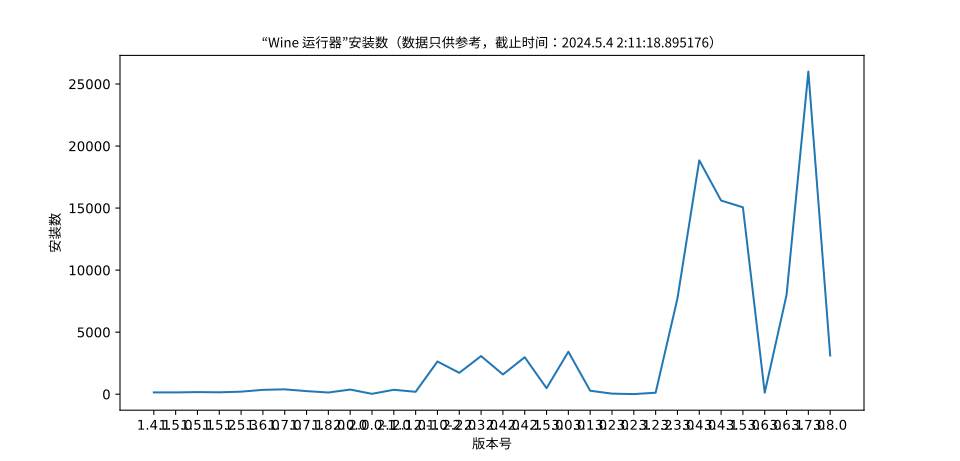
|
||||
|
||||
## Star 一下吧
|
||||
开发不易,原创艰难,给一个 Star 吧,你的 Star 是我继续开发的动力
|
||||

|
||||
|
||||
# ©2020-Now
|
||||
# ©2020-Now gfdgd xi
|
||||
|
||||
@@ -1,13 +0,0 @@
|
||||
#!/usr/bin/env python3
|
||||
import os
|
||||
def Remove(path):
|
||||
for i in os.listdir(path):
|
||||
nowPath = f"{path}/{i}"
|
||||
if os.path.isdir(nowPath):
|
||||
if i == "__pycache__":
|
||||
os.system(f"rm -rfv '{nowPath}'")
|
||||
else:
|
||||
Remove(nowPath)
|
||||
programPath = os.path.split(os.path.realpath(__file__))[0] # 返回 string
|
||||
debPath = f"{programPath}/deb"
|
||||
Remove(debPath)
|
||||
@@ -0,0 +1,23 @@
|
||||
<RCC>
|
||||
<qresource prefix="/">
|
||||
<file>information.json</file>
|
||||
<file>LICENSE</file>
|
||||
</qresource>
|
||||
<qresource prefix="/Icon">
|
||||
<file>deepin-wine-runner_512x512.png</file>
|
||||
<file>deepin-wine-runner.svg</file>
|
||||
<file>Icon/Program/AboutIcon0.png</file>
|
||||
</qresource>
|
||||
<qresource prefix="/Icon/QR">
|
||||
<file>Icon/QR/Alipay.jpg</file>
|
||||
<file>Icon/QR/QQ.png</file>
|
||||
<file>Icon/QR/Wechat.png</file>
|
||||
</qresource>
|
||||
<qresource prefix="/Icon/Function">
|
||||
<file>Icon/Function/CHROOT.png</file>
|
||||
<file>Icon/Function/more-wine.png</file>
|
||||
<file>Icon/Function/wine.png</file>
|
||||
<file>Icon/Function/wine23A.png</file>
|
||||
<file>Icon/Function/wine23P.png</file>
|
||||
</qresource>
|
||||
</RCC>
|
||||
@@ -0,0 +1,79 @@
|
||||
#include "about_this_program.h"
|
||||
#include "ui_about_this_program.h"
|
||||
|
||||
#include <QDateTime>
|
||||
|
||||
about_this_program::about_this_program(QWidget *parent) :
|
||||
QDialog(parent),
|
||||
ui(new Ui::about_this_program)
|
||||
{
|
||||
ui->setupUi(this);
|
||||
QString tips = tr("<h4>提示:</h4>\n"\
|
||||
"1、使用终端运行该程序,可以看到 wine 以及程序本身的提示和报错;\n"\
|
||||
"2、wine 32 位和 64 位的容器互不兼容;\n"\
|
||||
"3、所有的 wine 和 winetricks 均需要自行安装(可以从 菜单栏=>程序 里面进行安装);\n"\
|
||||
"4、本程序支持带参数运行 wine 程序(之前版本也可以),只需要按以下格式即可:\n"\
|
||||
"exe路径\' 参数 \'\n"\
|
||||
"即可(单引号需要输入);\n"\
|
||||
"5、wine 容器如果没有指定,则会默认为 ~/.wine;\n"\
|
||||
"6、如果可执行文件比较大的话,会出现点击“获取该程序运行情况”出现假死的情况,因为正在后台读取 SHA1,只需要等一下即可(读取速度依照您电脑处理速度、读写速度、可执行文件大小等有关);\n"\
|
||||
"7、如果非 X86 的用户的 UOS 专业版用户想要使用的话,只需要在应用商店安装一个 Wine 版本微信即可在本程序选择正确的 Wine 运行程序;");
|
||||
QString aboutProgram = tr("<p>Wine运行器是一个能让Linux用户更加方便地运行Windows应用的程序。原版的 Wine 只能使用命令操作,且安装过程较为繁琐,对小白不友好。于是该运行器为了解决该痛点,内置了对Wine图形化的支持、Wine 安装器、微型应用商店、各种Wine工具、自制的Wine程序打包器、运行库安装工具等。</p>\n"\
|
||||
"<p>它同时还内置了基于Qemu/VirtualBox制作的、专供小白使用的Windows虚拟机安装工具,可以做到只需下载系统镜像并点击安装即可,无需考虑虚拟机的安装、创建、分区等操作,也能在非 X86 架构安装 X86 架构的 Windows 操作系统(但是效率较低,可以运行些老系统)。</p>\n"\
|
||||
"<p>而且对于部分 Wine 应用适配者来说,提供了图形化的打包工具,以及提供了一些常用工具以及运行库的安装方式,以及能安装多种不同的 Wine 以测试效果,能极大提升适配效率。</p>\n"\
|
||||
"<p>且对于 Deepin23 用户做了特别优化,以便能在缺少 i386 运行库的情况下运行 Wine32。同时也为非 X86 架构用户提供了 Box86/64、Qemu User 的安装方式</p>\n"\
|
||||
"<pre>");
|
||||
QString goodRunSystem = tr("常见 Linux 发行版");
|
||||
QString updateThingsString = "";
|
||||
QString updateTime = "2023年12月24日";
|
||||
QString thankText = "";
|
||||
QString version = "";
|
||||
QString programUrl = "https://gitee.com/gfdgd-xi/deep-wine-runner\nhttps://github.com/gfdgd-xi/deep-wine-runner\nhttps://gfdgd-xi.github.io";
|
||||
QString about = "<style>\n"\
|
||||
"a:link, a:active {{\n"\
|
||||
" text-decoration: none;\n"\
|
||||
"}}\n"\
|
||||
"</style>\n"\
|
||||
"<h1>关于</h1>\n"\
|
||||
"" + aboutProgram + "\n"\
|
||||
"\n"\
|
||||
"版本:" + version + "\n"\
|
||||
"适用平台:" + goodRunSystem + "\n"\
|
||||
"安装包构建时间:" + __DATE__ + " " + __TIME__ + "\n"\
|
||||
"Qt 版本:" + qVersion() + "\n"\
|
||||
"程序官网:" + programUrl + "\n"\
|
||||
"<b>Wine 运行器 QQ 交流群:762985460</b>\n"\
|
||||
"<b>Wine运行器 QQ 频道:https://pd.qq.com/s/edqkgeydx</b>\n"\
|
||||
"当前程序占用体积:@programSize@MB</pre>\n"\
|
||||
"<p>本程序依照 GPLV3 协议开源</p>\n"\
|
||||
"<hr>\n"\
|
||||
"<h1>鸣谢名单</h1>\n"\
|
||||
"<pre>" + thankText + "</pre>\n"\
|
||||
"<hr>\n"\
|
||||
"<h1>更新内容</h1>\n"\
|
||||
"<pre>" + updateThingsString + "\n"\
|
||||
"<b>更新时间:" + updateTime + "</b></pre>\n"\
|
||||
"<hr>\n"\
|
||||
"<h1>提示</h1>\n"\
|
||||
"<pre>" + tips + "\n"\
|
||||
"</pre>\n"\
|
||||
"<hr>\n"\
|
||||
"<h1>友谊链接</h1>\n"\
|
||||
"<pre>星火应用商店:<a href='https://spark-app.store/'>https://spark-app.store/</a>\n"\
|
||||
"Deepin 官网:<a href='https://www.deepin.org'>https://www.deepin.org</a>\n"\
|
||||
"Deepin 论坛:<a href='https://bbs.deepin.org'>https://bbs.deepin.org</a>\n"\
|
||||
"gfdgd xi:<a href='https://gfdgd-xi.github.io'>https://gfdgd-xi.github.io</a>\n"\
|
||||
"<hr>\n"\
|
||||
"<h1>©2020~" + QDateTime(QDateTime::currentDateTime()).toString("yyyy") + " By gfdgd xi</h1>";
|
||||
}
|
||||
|
||||
about_this_program::~about_this_program()
|
||||
{
|
||||
delete ui;
|
||||
}
|
||||
|
||||
void about_this_program::on_ok_clicked()
|
||||
{
|
||||
this->close();
|
||||
}
|
||||
|
||||
@@ -0,0 +1,25 @@
|
||||
#ifndef ABOUT_THIS_PROGRAM_H
|
||||
#define ABOUT_THIS_PROGRAM_H
|
||||
|
||||
#include <QDialog>
|
||||
|
||||
namespace Ui {
|
||||
class about_this_program;
|
||||
}
|
||||
|
||||
class about_this_program : public QDialog
|
||||
{
|
||||
Q_OBJECT
|
||||
|
||||
public:
|
||||
explicit about_this_program(QWidget *parent = nullptr);
|
||||
~about_this_program();
|
||||
|
||||
private slots:
|
||||
void on_ok_clicked();
|
||||
|
||||
private:
|
||||
Ui::about_this_program *ui;
|
||||
};
|
||||
|
||||
#endif // ABOUT_THIS_PROGRAM_H
|
||||
@@ -0,0 +1,78 @@
|
||||
<?xml version="1.0" encoding="UTF-8"?>
|
||||
<ui version="4.0">
|
||||
<class>about_this_program</class>
|
||||
<widget class="QDialog" name="about_this_program">
|
||||
<property name="geometry">
|
||||
<rect>
|
||||
<x>0</x>
|
||||
<y>0</y>
|
||||
<width>863</width>
|
||||
<height>498</height>
|
||||
</rect>
|
||||
</property>
|
||||
<property name="windowTitle">
|
||||
<string>关于 Wine 运行器</string>
|
||||
</property>
|
||||
<property name="windowIcon">
|
||||
<iconset resource="Resources.qrc">
|
||||
<normaloff>:/Icon/deepin-wine-runner.svg</normaloff>:/Icon/deepin-wine-runner.svg</iconset>
|
||||
</property>
|
||||
<layout class="QGridLayout" name="gridLayout">
|
||||
<item row="0" column="1">
|
||||
<widget class="QTextBrowser" name="aboutInfo"/>
|
||||
</item>
|
||||
<item row="1" column="1">
|
||||
<layout class="QHBoxLayout" name="horizontalLayout">
|
||||
<item>
|
||||
<spacer name="horizontalSpacer">
|
||||
<property name="orientation">
|
||||
<enum>Qt::Horizontal</enum>
|
||||
</property>
|
||||
<property name="sizeHint" stdset="0">
|
||||
<size>
|
||||
<width>40</width>
|
||||
<height>20</height>
|
||||
</size>
|
||||
</property>
|
||||
</spacer>
|
||||
</item>
|
||||
<item>
|
||||
<widget class="QPushButton" name="ok">
|
||||
<property name="text">
|
||||
<string>确定</string>
|
||||
</property>
|
||||
</widget>
|
||||
</item>
|
||||
</layout>
|
||||
</item>
|
||||
<item row="0" column="0">
|
||||
<layout class="QVBoxLayout" name="verticalLayout">
|
||||
<item>
|
||||
<widget class="QLabel" name="iconShow">
|
||||
<property name="text">
|
||||
<string><a><img src=":/Icon/deepin-wine-runner.svg" width=256 ></a></string>
|
||||
</property>
|
||||
</widget>
|
||||
</item>
|
||||
<item>
|
||||
<spacer name="verticalSpacer">
|
||||
<property name="orientation">
|
||||
<enum>Qt::Vertical</enum>
|
||||
</property>
|
||||
<property name="sizeHint" stdset="0">
|
||||
<size>
|
||||
<width>20</width>
|
||||
<height>40</height>
|
||||
</size>
|
||||
</property>
|
||||
</spacer>
|
||||
</item>
|
||||
</layout>
|
||||
</item>
|
||||
</layout>
|
||||
</widget>
|
||||
<resources>
|
||||
<include location="Resources.qrc"/>
|
||||
</resources>
|
||||
<connections/>
|
||||
</ui>
|
||||
@@ -1,30 +0,0 @@
|
||||
Package: spark-deepin-wine-runner
|
||||
Version: 3.1.0
|
||||
Maintainer: gfdgd xi <3025613752@qq.com>
|
||||
Homepage: https://gitee.com/gfdgd-xi-org/deep-wine-runner
|
||||
Architecture: all
|
||||
Severity: serious
|
||||
Certainty: possible
|
||||
Check: binaries
|
||||
Type: binary, udeb
|
||||
Priority: optional
|
||||
Depends: python3, python3-pil, libc6, python3-pil.imagetk, python3-pyquery, aria2, curl, unrar, unzip, python3-requests, python3-pyqt5, python3-psutil, deepin-terminal | mate-terminal | gnome-terminal | xfce4-terminal, python3-dbus, python3-pip, p7zip-full, sudo
|
||||
Recommends: winbind, wimtools, python3-pyqt5.qtwebengine
|
||||
Section: utils
|
||||
Conflicts: spark.deepin-venturi-setter, spark-deepin-wine5-application-packer, spark-deepin-wine-runner-52, spark-deepin-wine-runner
|
||||
Replaces: spark.deepin-venturi-setter, spark-deepin-wine5-application-packer, spark-deepin-wine-runner-52, spark-deepin-wine-runner
|
||||
Installed-Size: 25856
|
||||
Description: gfdgd xi、为什么您不喜欢熊出没和阿布呢 制作的 wine 运行器,RacoonGX 团队作品
|
||||
3.1.0 更新内容:
|
||||
※1、不基于生态适配脚本打包器支持禁用 Mono/Gecko 打包器;
|
||||
※2、自动容器配置脚本新增命令 decompressionbottle、programforum、installmsi 以及上述命令的帮助;
|
||||
※3、自动容器配置脚本新增评论功能;
|
||||
※4、自动容器配置脚本新增许多应用安装脚本;
|
||||
※5、安装 Windows 虚拟机功能更换应答镜像图标并添加常用 Windows 组件安装功能;
|
||||
※6、安装 Windows 虚拟机功能提供镜像下载的网盘链接;
|
||||
※7、简易打包器支持自动添加宋体;
|
||||
8、修复 installfont 命令下载的字体目录错误问题;
|
||||
9、修复提交日志功能在提交成功时依旧提示提交失败问题;
|
||||
10、支持强制启用所有被禁用的组件(不推荐)。
|
||||
更新时间:2023年01月06日
|
||||
作者:gfdgd xi、为什么您不喜欢熊出没和阿布呢,RacoonGX 团队作品
|
||||
@@ -1,67 +0,0 @@
|
||||
#!/bin/sh
|
||||
# 使用系统默认的 sh 运行
|
||||
#################################################################################################################
|
||||
# 作者:gfdgd xi、为什么您不喜欢熊出没和阿布呢
|
||||
# 版本:3.0.0
|
||||
# 更新时间:2022年10月02日
|
||||
# 感谢:感谢 wine、deepin-wine 以及星火团队,提供了 wine、deepin-wine、spark-wine-devel 给大家使用,让我能做这个程序
|
||||
# 基于 sh
|
||||
#################################################################################################################
|
||||
# 非强制性的必应组件,所以成功不成功都行
|
||||
echo 安装组件
|
||||
python3 -m pip install --upgrade pynput --trusted-host https://repo.huaweicloud.com -i https://repo.huaweicloud.com/repository/pypi/simple > /dev/null 2>&1 | true
|
||||
python3 -m pip install --upgrade xpinyin --trusted-host https://repo.huaweicloud.com -i https://repo.huaweicloud.com/repository/pypi/simple > /dev/null 2>&1 | true
|
||||
echo 执行完成
|
||||
echo 移除旧组件
|
||||
if [ -d /opt/apps/deepin-wine-runner/arm-package ]; then
|
||||
rm -rf /opt/apps/deepin-wine-runner/arm-package
|
||||
fi
|
||||
if [ -d /opt/apps/deepin-wine-runner/dlls-arm ]; then
|
||||
rm -rf /opt/apps/deepin-wine-runner/dlls-arm
|
||||
fi
|
||||
if [ -d /opt/apps/deepin-wine-runner/exa ]; then
|
||||
rm -rf /opt/apps/deepin-wine-runner/exa
|
||||
fi
|
||||
if [ -d /opt/apps/deepin-wine-runner/dxvk ]; then
|
||||
rm -rf /opt/apps/deepin-wine-runner/dxvk
|
||||
fi
|
||||
echo 移除完成
|
||||
# 如果为非 X86 PC,可以删除掉一些无用组件(主要是用不了)
|
||||
if [ `arch` != "x86_64" ]; then
|
||||
echo 非X86架构,删除对非X86架构无用的组件
|
||||
# 删除虚拟机功能
|
||||
rm -rf /opt/apps/deepin-wine-runner/StartVM.sh
|
||||
rm -rf /opt/apps/deepin-wine-runner/RunVM.sh
|
||||
rm -rf /opt/apps/deepin-wine-runner/VM
|
||||
rm -rf /usr/share/applications/spark-deepin-wine-runner-control-vm.desktop
|
||||
rm -rf /usr/share/applications/spark-deepin-wine-runner-start-vm.desktop
|
||||
# 删除安装 wine 功能
|
||||
rm -rf "/opt/apps/deepin-wine-runner/wine install"
|
||||
# 这个注释掉的理论可用,不移除
|
||||
#rm -rf "/opt/apps/deepin-wine-runner/wine"
|
||||
rm -rf /usr/bin/deepin-wine-runner-wine-installer
|
||||
rm -rf /usr/bin/deepin-wine-runner-wine-install-deepin23
|
||||
rm -rf /usr/bin/deepin-wine-runner-wine-install
|
||||
rm -rf /usr/bin/deepin-wine-runner-winehq-install
|
||||
rm -rf /opt/apps/deepin-wine-runner/InstallWineOnDeepin23.py
|
||||
rm -rf /opt/apps/deepin-wine-runner/sparkstore.list
|
||||
rm -rf /opt/apps/deepin-wine-runner/AllInstall.py
|
||||
rm -rf /opt/apps/deepin-wine-runner/InstallNewWineHQ.sh
|
||||
fi
|
||||
# 到时候切换 gpg 源会方便很多
|
||||
if [ -r /etc/apt/sources.list.d/better-dde.list ]; then
|
||||
if [ -d /usr/share/deepin-installer ]; then
|
||||
# 用于修复 Deepin Community Live CD Install 版签名过期的问题
|
||||
wget -P /tmp/gfdgd-xi-sources https://code.gitlink.org.cn/gfdgd_xi/gfdgd-xi-apt-mirrors/raw/branch/master/gpg.asc
|
||||
rm -rfv /etc/apt/trusted.gpg.d/gfdgdxi-list.gpg | true
|
||||
cp -v /tmp/gfdgd-xi-sources/gpg.asc.gpg /etc/apt/trusted.gpg.d/gfdgdxi-list.gpg
|
||||
# 用于修复 2022.11.25 Better DDE 导致的 Deepin Community Live CD Install 版问题
|
||||
# 移除 Better DDE 源
|
||||
rm -rfv /etc/apt/sources.list.d/better-dde.list
|
||||
apt update > /dev/null 2>&1 | true
|
||||
fi
|
||||
fi
|
||||
# 设置目录权限,让用户可读可写,方便后续删除组件
|
||||
chmod 777 -R /opt/apps/deepin-wine-runner
|
||||
# 向服务器返回安装数加1(不显示内容且忽略错误)
|
||||
python3 /opt/apps/deepin-wine-runner/Download.py 3.1.0 > /dev/null 2>&1 | true
|
||||
@@ -1,54 +0,0 @@
|
||||
#!/bin/bash
|
||||
# 使用系统默认的 sh 运行
|
||||
#################################################################################################################
|
||||
# 作者:gfdgd xi、为什么您不喜欢熊出没和阿布呢
|
||||
# 版本:2.2.0
|
||||
# 更新时间:2022年09月24日
|
||||
# 感谢:感谢 wine、deepin-wine 以及星火团队,提供了 wine、deepin-wine、spark-wine-devel 给大家使用,让我能做这个程序
|
||||
# 基于 sh
|
||||
#################################################################################################################
|
||||
# 删除软件残留,简单粗暴一点直接全部删掉,防止出现警告
|
||||
# 加判断是为了怕 reinstall 后程序就再也打不开了(除非卸载后重新安装)
|
||||
if [ "$1" = "remove" ] || [ "$1" = "purge" ]; then
|
||||
rm -rf /opt/apps/deepin-wine-runner/
|
||||
fi
|
||||
# 删除软件缓存(留着也没什么用了)
|
||||
# 缓存目录:~/.cache/deepin-wine-runner
|
||||
if [ "$1" = "remove" ] || [ "$1" = "purge" ]; then
|
||||
|
||||
echo "清理程序缓存"
|
||||
|
||||
for username in $(ls /home); do
|
||||
echo /home/$username
|
||||
if [ -d "/home/$username/.cache/deepin-wine-runner/" ]; then
|
||||
rm -rf "/home/$username/.cache/deepin-wine-runner/"
|
||||
fi
|
||||
done
|
||||
# 清理 root 用户的缓存文件
|
||||
echo /root
|
||||
if [ -d "/root/.cache/deepin-wine-runner/" ]; then
|
||||
rm -rf "/root/.cache/deepin-wine-runner/"
|
||||
fi
|
||||
else
|
||||
echo "非卸载,跳过清理"
|
||||
fi
|
||||
# 删除软件配置文件(只限“purge”)
|
||||
# 配置目录:~/.config/deepin-wine-runner
|
||||
if [ "$1" = "purge" ]; then
|
||||
|
||||
echo "清理程序配置文件"
|
||||
|
||||
for username in $(ls /home); do
|
||||
echo /home/$username
|
||||
if [ -d "/home/$username/.config/deepin-wine-runner/" ]; then
|
||||
rm -rf "/home/$username/.config/deepin-wine-runner/"
|
||||
fi
|
||||
done
|
||||
# 清理 root 用户的配置文件
|
||||
echo /root
|
||||
if [ -d "/root/.config/deepin-wine-runner/" ]; then
|
||||
rm -rf "/root/.config/deepin-wine-runner/"
|
||||
fi
|
||||
else
|
||||
echo "非 purge,跳过清理"
|
||||
fi
|
||||
@@ -1 +0,0 @@
|
||||
/opt/apps/deepin-wine-runner/API/Python/
|
||||
@@ -1,12 +0,0 @@
|
||||
[Desktop Entry]
|
||||
Type=Application
|
||||
X-Categories=System;Wine;
|
||||
Exec=/usr/bin/deepin-wine-package-builder "~/.wine" %F
|
||||
Icon=/opt/apps/deepin-wine-runner/deepin-wine-runner.svg
|
||||
Name=Wine Package Builder
|
||||
Name[zh]=Wine 打包器
|
||||
Terminal=false
|
||||
StartupNotify=true
|
||||
NoDisplay=true
|
||||
Keywords=exe;scr;
|
||||
MimeType=application/x-ms-dos-executable;application/x-msi;application/x-ms-shortcut;
|
||||
@@ -1,12 +0,0 @@
|
||||
[Desktop Entry]
|
||||
Type=Application
|
||||
X-Categories=System;Wine;
|
||||
Exec=/usr/bin/deepin-wine-packager-easy-builder %F
|
||||
Icon=/opt/apps/deepin-wine-runner/deepin-wine-runner.svg
|
||||
Name=Wine Package Builder
|
||||
Name[zh]=Wine 简易打包器
|
||||
Terminal=false
|
||||
StartupNotify=true
|
||||
NoDisplay=true
|
||||
Keywords=exe;scr;
|
||||
MimeType=application/x-ms-dos-executable;application/x-msi;application/x-ms-shortcut;
|
||||
@@ -1,10 +0,0 @@
|
||||
[Desktop Entry]
|
||||
Type=Application
|
||||
X-Categories=System;Wine;
|
||||
Exec=/usr/bin/deepin-wine-packager-with-script
|
||||
Icon=/opt/apps/deepin-wine-runner/deepin-wine-runner.svg
|
||||
Name=Wine Package Builder For UOS
|
||||
NoDisplay=true
|
||||
Name[zh]=Wine 打包器(基于活动脚本)
|
||||
Terminal=false
|
||||
StartupNotify=true
|
||||
@@ -1,10 +0,0 @@
|
||||
[Desktop Entry]
|
||||
Type=Application
|
||||
X-Categories=System;Wine;
|
||||
Exec=/opt/apps/deepin-wine-runner/RunVM.sh %F
|
||||
Icon=/opt/apps/deepin-wine-runner/deepin-wine-runner.svg
|
||||
Name=Setting VirtualMachine
|
||||
Name[zh]=设置 Windows 虚拟机
|
||||
NoDisplay=true
|
||||
Terminal=false
|
||||
StartupNotify=true
|
||||
@@ -1,9 +0,0 @@
|
||||
[Desktop Entry]
|
||||
Type=Application
|
||||
X-Categories=System;
|
||||
Exec=/opt/apps/deepin-wine-runner/StartVM.sh %F
|
||||
Icon=/opt/apps/deepin-wine-runner/deepin-wine-runner.svg
|
||||
Name=Start Windows VirtualMachine
|
||||
Name[zh]=开启 Windows 虚拟机
|
||||
Terminal=false
|
||||
StartupNotify=true
|
||||
@@ -1,11 +0,0 @@
|
||||
[Desktop Entry]
|
||||
Type=Application
|
||||
X-Categories=System;Wine;
|
||||
Exec=/usr/bin/deepin-wine-runner %F
|
||||
Icon=/opt/apps/deepin-wine-runner/deepin-wine-runner.svg
|
||||
Name=Wine Runner
|
||||
Name[zh]=Wine 运行器
|
||||
Terminal=false
|
||||
StartupNotify=true
|
||||
Keywords=exe;scr;
|
||||
MimeType=application/x-ms-dos-executable;application/x-msi;application/x-ms-shortcut;
|
||||
@@ -1,21 +0,0 @@
|
||||
<?xml version="1.0" encoding="UTF-8"?>
|
||||
<!DOCTYPE policyconfig PUBLIC
|
||||
"-//freedesktop//DTD PolicyKit Policy Configuration 1.0//EN"
|
||||
"http://www.freedesktop.org/standards/PolicyKit/1/policyconfig.dtd">
|
||||
<policyconfig>
|
||||
<vendor>gfdgd xi</vendor>
|
||||
<vendor_url>https://gitee.com/gfdgd-xi/deep-wine-runner/</vendor_url>
|
||||
<action id="com.deepin.pkexec.deepin-wine-venturi-setter">
|
||||
<message>Authentication is required to change run_v3 file manager</message>
|
||||
<message xml:lang="zh_CN">修改 run_v3 文管需要输入密码</message>
|
||||
<icon_name>preferences-system</icon_name>
|
||||
<defaults>
|
||||
<allow_any>no</allow_any>
|
||||
<allow_inactive>no</allow_inactive>
|
||||
<allow_active>auth_admin_keep</allow_active>
|
||||
</defaults>
|
||||
<annotate key="org.freedesktop.policykit.exec.path">/opt/apps/deepin-wine-runner/deepin-wine-venturi-setter.py</annotate>
|
||||
<annotate key="org.freedesktop.policykit.exec.allow_gui">true</annotate>
|
||||
</action>
|
||||
|
||||
</policyconfig>
|
||||
@@ -1,21 +0,0 @@
|
||||
<?xml version="1.0" encoding="UTF-8"?>
|
||||
<!DOCTYPE policyconfig PUBLIC
|
||||
"-//freedesktop//DTD PolicyKit Policy Configuration 1.0//EN"
|
||||
"http://www.freedesktop.org/standards/PolicyKit/1/policyconfig.dtd">
|
||||
<policyconfig>
|
||||
<vendor>gfdgd xi</vendor>
|
||||
<vendor_url>https://gitee.com/gfdgd-xi/deep-wine-runner/</vendor_url>
|
||||
<action id="com.deepin.pkexec.mount">
|
||||
<message>Authentication is required to mount file</message>
|
||||
<message xml:lang="zh_CN">挂载文件需要输入密码</message>
|
||||
<icon_name>preferences-system</icon_name>
|
||||
<defaults>
|
||||
<allow_any>no</allow_any>
|
||||
<allow_inactive>no</allow_inactive>
|
||||
<allow_active>auth_admin_keep</allow_active>
|
||||
</defaults>
|
||||
<annotate key="org.freedesktop.policykit.exec.path">/usr/bin/mount</annotate>
|
||||
<annotate key="org.freedesktop.policykit.exec.allow_gui">true</annotate>
|
||||
</action>
|
||||
|
||||
</policyconfig>
|
||||
@@ -1,21 +0,0 @@
|
||||
<?xml version="1.0" encoding="UTF-8"?>
|
||||
<!DOCTYPE policyconfig PUBLIC
|
||||
"-//freedesktop//DTD PolicyKit Policy Configuration 1.0//EN"
|
||||
"http://www.freedesktop.org/standards/PolicyKit/1/policyconfig.dtd">
|
||||
<policyconfig>
|
||||
<vendor>gfdgd xi</vendor>
|
||||
<vendor_url>https://gitee.com/gfdgd-xi/deep-wine-runner/</vendor_url>
|
||||
<action id="com.deepin.pkexec.umount">
|
||||
<message>Authentication is required to unmount file</message>
|
||||
<message xml:lang="zh_CN">卸载文件需要输入密码</message>
|
||||
<icon_name>preferences-system</icon_name>
|
||||
<defaults>
|
||||
<allow_any>no</allow_any>
|
||||
<allow_inactive>no</allow_inactive>
|
||||
<allow_active>auth_admin_keep</allow_active>
|
||||
</defaults>
|
||||
<annotate key="org.freedesktop.policykit.exec.path">/usr/bin/umount</annotate>
|
||||
<annotate key="org.freedesktop.policykit.exec.allow_gui">true</annotate>
|
||||
</action>
|
||||
|
||||
</policyconfig>
|
||||
@@ -0,0 +1,38 @@
|
||||
QT += core gui
|
||||
|
||||
greaterThan(QT_MAJOR_VERSION, 4): QT += widgets
|
||||
|
||||
CONFIG += c++17
|
||||
|
||||
# You can make your code fail to compile if it uses deprecated APIs.
|
||||
# In order to do so, uncomment the following line.
|
||||
#DEFINES += QT_DISABLE_DEPRECATED_BEFORE=0x060000 # disables all the APIs deprecated before Qt 6.0.0
|
||||
|
||||
SOURCES += \
|
||||
about_this_program.cpp \
|
||||
main.cpp \
|
||||
mainwindow.cpp \
|
||||
qr.cpp
|
||||
|
||||
HEADERS += \
|
||||
about_this_program.h \
|
||||
mainwindow.h \
|
||||
qr.h
|
||||
|
||||
FORMS += \
|
||||
about_this_program.ui \
|
||||
mainwindow.ui \
|
||||
qr.ui
|
||||
|
||||
TRANSLATIONS += \
|
||||
deep-wine-runner-cpp_zh_CN.ts
|
||||
CONFIG += lrelease
|
||||
CONFIG += embed_translations
|
||||
|
||||
# Default rules for deployment.
|
||||
qnx: target.path = /tmp/$${TARGET}/bin
|
||||
else: unix:!android: target.path = /opt/$${TARGET}/bin
|
||||
!isEmpty(target.path): INSTALLS += target
|
||||
|
||||
RESOURCES += \
|
||||
Resources.qrc
|
||||
@@ -0,0 +1,3 @@
|
||||
<?xml version="1.0" encoding="utf-8"?>
|
||||
<!DOCTYPE TS>
|
||||
<TS version="2.1" language="zh_CN"></TS>
|
||||

|
After Width: | Height: | Size: 34 KiB |

@@ -1,6 +1,10 @@
|
||||
{
|
||||
"Version": "3.1.0",
|
||||
"Version": "3.6.1",
|
||||
"Time": "未知",
|
||||
"Thank": [
|
||||
"感谢 @ёжезийлёзйз 进行 Loongarch 架构的测试(旧世界,远程)",
|
||||
"感谢 @run@3a4k 提供 3a4000 测试机器(远程)",
|
||||
"感谢 RacoonGX 的付出与贡献",
|
||||
"感谢 @Amber 编写的《使用wine运行器打包无安装包的软件》:https://bbs.deepin.org/post/247720",
|
||||
"感谢 @豪 提供程序图标",
|
||||
"感谢 @鹤舞白沙 对程序文案进行优化以及编写《Wine运行器和Wine打包器傻瓜式使用教程(小白专用) 》:https://bbs.deepin.org/post/246837",
|
||||
|
||||
@@ -1,3 +0,0 @@
|
||||
#!/bin/bash
|
||||
XDG_CURRENT_DESKTOP="Deepin"
|
||||
$1 -platformtheme deepin "$@"
|
||||
@@ -0,0 +1,22 @@
|
||||
#include "mainwindow.h"
|
||||
|
||||
#include <QApplication>
|
||||
#include <QLocale>
|
||||
#include <QTranslator>
|
||||
|
||||
int main(int argc, char *argv[])
|
||||
{
|
||||
QApplication a(argc, argv);
|
||||
|
||||
QTranslator translator;
|
||||
const QStringList uiLanguages = QLocale::system().uiLanguages();
|
||||
for (const QString &locale : uiLanguages) {
|
||||
const QString baseName = "deep-wine-runner-cpp_" + QLocale(locale).name();
|
||||
if (translator.load(":/i18n/" + baseName)) {
|
||||
a.installTranslator(&translator);
|
||||
break;
|
||||
}
|
||||
}
|
||||
MainWindow w;
|
||||
return a.exec();
|
||||
}
|
||||
@@ -0,0 +1,584 @@
|
||||
#include "mainwindow.h"
|
||||
#include <QGridLayout>
|
||||
#include <QLabel>
|
||||
#include <QComboBox>
|
||||
#include <QPushButton>
|
||||
#include <QMainWindow>
|
||||
#include <QObject>
|
||||
#include <QSizePolicy>
|
||||
#include <QSpacerItem>
|
||||
#include <QTextBrowser>
|
||||
#include <QCoreApplication>
|
||||
#include <iostream>
|
||||
#include <QDebug>
|
||||
#include <QIODevice>
|
||||
#include <QJsonDocument>
|
||||
#include <QJsonObject>
|
||||
#include <QFile>
|
||||
#include <QProcess>
|
||||
#include <QMessageBox>
|
||||
#include <QObject>
|
||||
using namespace std;
|
||||
QComboBox *MainWindow::e1;
|
||||
QComboBox *MainWindow::e2;
|
||||
QComboBox *MainWindow::o1;
|
||||
QMap<QString, QString> MainWindow::setting;
|
||||
QMap<QString, QString> MainWindow::wine;
|
||||
QString MainWindow::lastRunCommand = "";
|
||||
MainWindow::MainWindow(){
|
||||
/*********
|
||||
* 设置变量
|
||||
*********/
|
||||
|
||||
// 如果要添加其他 wine,请使用安装更多 Wine 功能
|
||||
|
||||
|
||||
QMainWindow *window = new QMainWindow();
|
||||
QWidget *widget = new QWidget();
|
||||
window->setCentralWidget(widget);
|
||||
QGridLayout *mainLayout = new QGridLayout();
|
||||
QSizePolicy size;
|
||||
//size->setVerticalPolicy(0);
|
||||
QWidget *leftUp = new QWidget();
|
||||
mainLayout->addWidget(leftUp, 0, 0, 1, 1);
|
||||
QGridLayout *leftUpLayout = new QGridLayout();
|
||||
leftUp->setLayout(leftUpLayout);
|
||||
QLabel *fastLabel = new QLabel(QObject::tr("快速启动"));
|
||||
fastLabel->setStyleSheet("font: 30px;");
|
||||
leftUpLayout->addWidget(fastLabel, 0, 0, 1, 2);
|
||||
leftUpLayout->addWidget(new QLabel("<hr>"), 1, 0, 1, 2);
|
||||
leftUpLayout->addWidget(new QLabel(QObject::tr("请选择容器路径:")), 2, 0, 1, 1);
|
||||
e1 = new QComboBox();
|
||||
e1->setEditable(1);
|
||||
leftUpLayout->addWidget(e1, 3, 0, 1, 1);
|
||||
button1 = new QPushButton("浏览");
|
||||
//button1.clicked.connect(liulanbutton);
|
||||
leftUpLayout->addWidget(button1, 3, 1, 1, 1);
|
||||
leftUpLayout->addWidget(new QLabel(QObject::tr("请选择要执行的程序(EXE、MSI或者命令):")), 4, 0, 1, 1);
|
||||
e2 = new QComboBox();
|
||||
e2->setEditable(1);
|
||||
leftUpLayout->addWidget(e2, 5, 0, 1, 1);
|
||||
button2 = new QPushButton(QObject::tr("浏览"));
|
||||
//button2.clicked.connect(liulanexebutton);
|
||||
leftUpLayout->addWidget(button2, 5, 1, 1, 1);
|
||||
leftUpLayout->addWidget(new QLabel(QObject::tr("请选择WINE版本:")), 6, 0, 1, 1);
|
||||
o1 = new QComboBox();
|
||||
leftUpLayout->addWidget(o1, 7, 0, 1, 1);
|
||||
// 设置空间权重
|
||||
button1->setSizePolicy(size);
|
||||
button2->setSizePolicy(size);
|
||||
|
||||
// UI 创建
|
||||
QWidget *leftDown = new QWidget();
|
||||
mainLayout->addWidget(leftDown, 1, 0, 1, 1);
|
||||
QVBoxLayout *leftDownLayout = new QVBoxLayout();
|
||||
leftDown->setLayout(leftDownLayout);
|
||||
QLabel *highLabel = new QLabel(QObject::tr("高级功能"));
|
||||
highLabel->setStyleSheet("font: 30px;");
|
||||
leftDownLayout->addWidget(highLabel);
|
||||
leftDownLayout->addWidget(new QLabel("<hr>"));
|
||||
leftDownLayout->addWidget(new QLabel(QObject::tr("创建快捷方式(Desktop文件):")));
|
||||
QHBoxLayout *createDesktopLink = new QHBoxLayout();
|
||||
QLabel *label_r_2 = new QLabel(QObject::tr("名称:"));
|
||||
createDesktopLink->addWidget(label_r_2);
|
||||
QComboBox *combobox1 = new QComboBox();
|
||||
combobox1->setEditable(1);
|
||||
createDesktopLink->addWidget(combobox1);
|
||||
QPushButton *button5 = new QPushButton(QObject::tr("创建到桌面"));
|
||||
//button5.clicked.connect(make_desktop_on_desktop);
|
||||
createDesktopLink->addWidget(button5);
|
||||
QPushButton *saveDesktopFileOnLauncher = new QPushButton(QObject::tr("创建到开始菜单"));
|
||||
//saveDesktopFileOnLauncher.clicked.connect(make_desktop_on_launcher);
|
||||
createDesktopLink->addWidget(saveDesktopFileOnLauncher);
|
||||
leftDownLayout->addLayout(createDesktopLink);
|
||||
QGridLayout *programManager = new QGridLayout();
|
||||
leftDownLayout->addLayout(programManager);
|
||||
programManager->addWidget(new QLabel(QObject::tr("程序管理:")), 0, 0, 1, 1);
|
||||
getProgramIcon = new QPushButton(QObject::tr("提取图标"));
|
||||
//getProgramIcon.clicked.connect(lambda: RunWineProgram(f"{programPath}/BeCyIconGrabber.exe' '{e2.currentText()}" if e2.currentText()[:2].upper() == "C:" else f"{programPath}/BeCyIconGrabber.exe' 'z:/{e2.currentText()}"));
|
||||
programManager->addWidget(getProgramIcon, 1, 0, 1, 1);
|
||||
programManager->addWidget(new QLabel(" "), 1, 1, 1, 1);
|
||||
trasButton = new QPushButton(QObject::tr("窗口透明工具"));
|
||||
//trasButton.clicked.connect(lambda: RunWineProgram(f"{programPath}/窗体透明度设置工具.exe"));
|
||||
programManager->addWidget(trasButton, 1, 2, 1, 1);
|
||||
uninstallProgram = new QPushButton(QObject::tr("卸载程序"));
|
||||
//uninstallProgram.clicked.connect(lambda: RunWineProgram(f"{programPath}/geek.exe"));
|
||||
programManager->addWidget(new QLabel(" "), 1, 3, 1, 1);
|
||||
programManager->addWidget(uninstallProgram, 1, 4, 1, 1);
|
||||
miniAppStore = new QPushButton(QObject::tr("微型应用商店"));
|
||||
//miniAppStore.clicked.connect(lambda: threading.Thread(target=MiniAppStore).start());
|
||||
programManager->addWidget(new QLabel(" "), 1, 5, 1, 1);
|
||||
programManager->addWidget(miniAppStore, 1, 6, 1, 1);
|
||||
programManager->addWidget(new QLabel(" "), 1, 7, 1, 1);
|
||||
QPushButton *getProgramStatus = new QPushButton(QObject::tr("获取该程序运行情况"));
|
||||
//getProgramStatus.clicked.connect(ProgramRunStatusShow.ShowWindow);
|
||||
programManager->addWidget(getProgramStatus, 1, 8, 1, 1);
|
||||
QPushButton *getLoseDll = new QPushButton(QObject::tr("检测静态下程序缺少DLL"));
|
||||
//getLoseDll.clicked.connect(GetLoseDll);
|
||||
programManager->addWidget(new QLabel(" "), 1, 9, 1, 1);
|
||||
programManager->addWidget(getLoseDll, 1, 10, 1, 1);
|
||||
programManager->addItem(new QSpacerItem(20, 20, QSizePolicy::Expanding, QSizePolicy::Minimum), 1, 11, 1, 1);
|
||||
programManager->addWidget(new QLabel(QObject::tr("WINE配置:")), 2, 0, 1, 1);
|
||||
wineConfig = new QPushButton(QObject::tr("配置容器"));
|
||||
//wineConfig.clicked.connect(lambda: RunWineProgram("winecfg"));
|
||||
programManager->addWidget(wineConfig, 3, 0, 1, 1);
|
||||
QPushButton *fontAppStore = new QPushButton(QObject::tr("字体商店"));
|
||||
//fontAppStore.clicked.connect(FontAppStore);
|
||||
programManager->addWidget(fontAppStore, 3, 2, 1, 1);
|
||||
button_r_6 = new QPushButton(QObject::tr("RegShot"));
|
||||
//button_r_6.clicked.connect(lambda: RunWineProgram(f"{programPath}/RegShot/regshot.exe"));
|
||||
programManager->addWidget(button_r_6, 3, 4, 1, 1);
|
||||
QPushButton *sparkWineSetting = new QPushButton(QObject::tr("星火wine配置"));
|
||||
//sparkWineSetting.clicked.connect(lambda: threading.Thread(target=os.system, args=["bash /opt/durapps/spark-dwine-helper/spark-dwine-helper-settings/settings.sh"]).start());
|
||||
programManager->addWidget(sparkWineSetting, 3, 6, 1, 1);
|
||||
QPushButton *wineAutoConfig = new QPushButton(QObject::tr("自动/手动配置 Wine 容器"));
|
||||
//wineAutoConfig.clicked.connect(WineBottonAutoConfig);
|
||||
programManager->addWidget(wineAutoConfig, 3, 8, 1, 1);
|
||||
QPushButton *wineBottleReboot = new QPushButton(QObject::tr("重启指定Wine容器"));
|
||||
//wineBottleReboot.clicked.connect(lambda: RunWineProgram(f"wineboot' '-k"));
|
||||
programManager->addWidget(wineBottleReboot, 3, 10, 1, 1);
|
||||
|
||||
// 权重
|
||||
button5->setSizePolicy(size);
|
||||
saveDesktopFileOnLauncher->setSizePolicy(size);
|
||||
label_r_2->setSizePolicy(size);
|
||||
getProgramIcon->setSizePolicy(size);
|
||||
//trasButton.setSizePolicy(size);
|
||||
button_r_6->setSizePolicy(size);
|
||||
wineConfig->setSizePolicy(size);
|
||||
|
||||
QTextBrowser *returnText = new QTextBrowser();
|
||||
returnText->setStyleSheet("background-color: black;"\
|
||||
"color: white;");
|
||||
returnText->setText(QObject::tr("在此可以看到wine安装应用时的终端输出内容\n"\
|
||||
"=============================================\n"\
|
||||
"如果解决了你的问题,请不要吝啬你的star哟!\n"\
|
||||
"地址:\n"\
|
||||
"https://gitee.com/gfdgd-xi/deep-wine-runner\n"\
|
||||
"https://github.com/gfdgd-xi/deep-wine-runner\n"\
|
||||
"https://sourceforge.net/projects/deep-wine-runner"));
|
||||
mainLayout->setRowStretch(0, 2);
|
||||
mainLayout->setRowStretch(1, 1);
|
||||
mainLayout->setColumnStretch(0, 2);
|
||||
mainLayout->setColumnStretch(1, 1);
|
||||
mainLayout->addWidget(returnText, 0, 1, 2, 1);
|
||||
|
||||
// 版权
|
||||
QLabel *copy = new QLabel("程序版本:{version},<b>提示:Wine 无法保证可以运行所有的 Windows 程序,如果想要运行更多 Windows 程序,可以考虑虚拟机和双系统</b><br/>"\
|
||||
"<b>注:部分二进制兼容层会自动注册 binfmt(如原版的 Box86/64、Qemu User Static),则意味着无需在 Wine 版本那里特别指定兼容层,直接指定 Wine 即可</b><br/>"\
|
||||
"©2020~" + QDateTime(QDateTime::currentDateTime()).toString("yyyy") + " gfdgd xi");
|
||||
mainLayout->addWidget(copy, 2, 0, 1, 1);
|
||||
|
||||
// 程序运行
|
||||
QWidget *programRun = new QWidget();
|
||||
QHBoxLayout *programRunLayout = new QHBoxLayout();
|
||||
programRun->setLayout(programRunLayout);
|
||||
programRunLayout->addItem(new QSpacerItem(20, 20, QSizePolicy::Expanding, QSizePolicy::Minimum));
|
||||
QPushButton *button3 = new QPushButton(QObject::tr("运行程序"));
|
||||
//button3.clicked.connect(runexebutton);
|
||||
programRunLayout->addWidget(button3);
|
||||
QPushButton *killProgram = new QPushButton(QObject::tr("终止程序"));
|
||||
//killProgram.clicked.connect(KillProgram);
|
||||
programRunLayout->addWidget(killProgram);
|
||||
QPushButton *killBottonProgram = new QPushButton(QObject::tr("终止指定容器的程序"));
|
||||
//killBottonProgram.clicked.connect(lambda: threading.Thread(target=os.system, args=[f"'{programPath}/kill.sh' '{os.path.basename(e1.currentText())}'"]).start());
|
||||
programRunLayout->addWidget(killBottonProgram);
|
||||
mainLayout->addWidget(programRun, 2, 1, 1, 1);
|
||||
|
||||
// 窗口设置
|
||||
window->resize(widget->frameGeometry().width() * 2, widget->frameGeometry().height());
|
||||
window->setWindowIcon(QIcon(":/Icon/deepin-wine-runner.svg"));
|
||||
widget->setLayout(mainLayout);
|
||||
window->show();
|
||||
|
||||
CheckWine();
|
||||
|
||||
// 控件设置
|
||||
e1->addItems(findExeHistory);
|
||||
e2->addItems(wineBottonHistory);
|
||||
combobox1->addItems(shellHistory);
|
||||
o1->addItems(canUseWine);
|
||||
|
||||
|
||||
// 一个 Wine 都没有却用 Wine 的功能
|
||||
// 还是要处理的,至少不会闪退
|
||||
if(o1->currentText() == ""){
|
||||
o1->addItem("没有识别到任何Wine,请在菜单栏“程序”安装Wine或安装任意Wine应用");
|
||||
}
|
||||
QObject::connect(button3, &QPushButton::clicked, [&](){
|
||||
Runexebutton_threading *thread = new Runexebutton_threading();
|
||||
//QObject::connect(thread, &Runexebutton_threading::signal, this, [this](){});
|
||||
thread->start();
|
||||
});
|
||||
|
||||
}
|
||||
|
||||
void MainWindow::Runexebutton_threading::run(){
|
||||
QString programPath = QCoreApplication::applicationDirPath();
|
||||
QString wineBottlePath = "";
|
||||
if(e1->currentText() == ""){
|
||||
wineBottlePath = setting.value("DefultBotton");
|
||||
}
|
||||
else{
|
||||
wineBottlePath = e1->currentText();
|
||||
}
|
||||
QString option = "";
|
||||
if(setting.value("Architecture") != "Auto"){
|
||||
option += "WINEARCH=" + setting.value("Architecture") + " ";
|
||||
}
|
||||
if(setting.value("MonoGeckoInstaller") == "1"){
|
||||
option += "WINEDLLOVERRIDES=\"mscoree,mshtml=\" ";
|
||||
}
|
||||
if(setting.value("") != "1"){
|
||||
option += "WINEDEBUG=-all ";
|
||||
}
|
||||
else{
|
||||
option += "WINEDEBUG=FIXME,ERR,WARN,TRACE,Message ";
|
||||
}
|
||||
QString wineUsingOption = "";
|
||||
QString exePath = e2->currentText();
|
||||
QStringList fileName = {".exe"};
|
||||
bool changePath = false;
|
||||
for(QString i: fileName){
|
||||
if(exePath.contains(i)){
|
||||
qDebug() << i;
|
||||
qDebug() << exePath;
|
||||
int l = exePath.indexOf(i);
|
||||
exePath = exePath.mid(0, l + 4) + "' " + exePath.mid(l + 4) + " '";
|
||||
qDebug() << l;
|
||||
qDebug() << exePath;
|
||||
changePath = true;
|
||||
break;
|
||||
}
|
||||
}
|
||||
if(!changePath && QFile::exists(exePath)){
|
||||
// 删除前后无用空格以防止出现问题
|
||||
qDebug() << exePath;
|
||||
exePath = exePath.trimmed();
|
||||
// 有空格再说
|
||||
if(exePath.contains(" ")){
|
||||
int l = exePath.indexOf(" ");
|
||||
exePath = exePath.mid(0, l) + "' " + exePath.mid(l) + " '";
|
||||
qDebug() << l;
|
||||
}
|
||||
qDebug() << exePath;
|
||||
}
|
||||
if(o1->currentText() == "基于 UOS exagear 的 deepin-wine6-stable" ||
|
||||
o1->currentText() == "基于 UOS box86 的 deepin-wine6-stable"){
|
||||
wineUsingOption = "";
|
||||
}
|
||||
if(o1->currentText() == "基于 UOS box86 的 deepin-wine6-stable" ||
|
||||
o1->currentText() == "基于 UOS exagear 的 deepin-wine6-stable"){
|
||||
if(!QDir(programPath + "/dlls-arm").exists()){
|
||||
if(system(("7z x -y \"" + programPath + "/dlls-arm.7z\" -o\"" + programPath + "\"").toUtf8())){
|
||||
QMessageBox::critical(NULL, "错误", "无法解压资源");
|
||||
return;
|
||||
}
|
||||
QFile::remove(programPath + "/dlls-arm.7z");
|
||||
}
|
||||
}
|
||||
//QString runCommand = "";
|
||||
QString runCommand = "";
|
||||
QProcess *process = new QProcess();
|
||||
//if(setting.value("TerminalOpen") == "True"){
|
||||
if(0){
|
||||
if(e2->currentText().mid(-4) == ".msi" && QFile::exists(e2->currentText())){
|
||||
runCommand = "env WINEPREFIX='" + wineBottlePath + "' " + option + wine[o1->currentText()] + " msiexec /i '" + e2->currentText() + "' " + setting.value("WineOption");
|
||||
// OpenTerminal(runCommand)
|
||||
}
|
||||
// ……
|
||||
}
|
||||
else{
|
||||
if(e2->currentText().mid(-4) == ".msi" && QFile::exists(e2->currentText())){
|
||||
runCommand = "env WINEPREFIX='" + wineBottlePath + "' " + option + wine[o1->currentText()] + " msiexec /i '" + e2->currentText() + "' " + setting.value("WineOption");
|
||||
}
|
||||
else if(e2->currentText().mid(-4) == ".bat" && QFile::exists(e2->currentText())){
|
||||
runCommand = "WINEPREFIX='" + wineBottlePath + "' " + option + wine[o1->currentText()] + " wineconsole '" + e2->currentText() + "' " + setting["WineOption"];
|
||||
}
|
||||
else{
|
||||
runCommand = "WINEPREFIX='" + wineBottlePath + "' " + option + wine[o1->currentText()] + " '" + exePath + "' " + setting["WineOption"];
|
||||
}
|
||||
|
||||
}
|
||||
// 实时读取程序返回
|
||||
qDebug() << runCommand;
|
||||
lastRunCommand = runCommand;
|
||||
// 连接槽
|
||||
connect(process, &QProcess::readyReadStandardOutput, this, [this, process](){
|
||||
//emit this->signal(QString::fromUtf8(process.readAll()));
|
||||
});
|
||||
//if(setting.value("TerminalOpen") != "True"){
|
||||
if(1){
|
||||
process->setReadChannel(QProcess::StandardOutput);
|
||||
process->start(runCommand);
|
||||
process->waitForStarted();
|
||||
process->waitForFinished();
|
||||
process->close();
|
||||
}
|
||||
// ……
|
||||
}
|
||||
|
||||
void MainWindow::DisableButton(bool things){
|
||||
button_r_6->setDisabled(things);
|
||||
button1->setDisabled(things);
|
||||
button2->setDisabled(things);
|
||||
button3->setDisabled(things);
|
||||
wineConfig->setDisabled(things);
|
||||
e1->setDisabled(things);
|
||||
e2->setDisabled(things);
|
||||
o1->setDisabled(things);
|
||||
miniAppStore->setDisabled(things);
|
||||
//winetricksOpen->configure(state=a[things])
|
||||
getProgramIcon->setDisabled(things);
|
||||
uninstallProgram->setDisabled(things);
|
||||
trasButton->setDisabled(things);
|
||||
}
|
||||
|
||||
void MainWindow::runexebutton(){
|
||||
DisableButton(1);
|
||||
|
||||
}
|
||||
|
||||
MainWindow::~MainWindow()
|
||||
{
|
||||
//delete ui;
|
||||
}
|
||||
|
||||
QString MainWindow::get_home(){
|
||||
return QDir::homePath();
|
||||
}
|
||||
|
||||
QString MainWindow::readtxt(QString path){
|
||||
QFile file(path);
|
||||
file.open(QIODevice::ReadOnly);
|
||||
QString things = file.readAll();
|
||||
file.close();
|
||||
return things;
|
||||
}
|
||||
|
||||
QByteArray MainWindow::readtxtByte(QString path){
|
||||
QFile file(path);
|
||||
file.open(QIODevice::ReadOnly);
|
||||
QByteArray things = file.readAll();
|
||||
file.close();
|
||||
return things;
|
||||
}
|
||||
|
||||
void MainWindow::write_txt(QString path, QByteArray things){
|
||||
QFile file(path);
|
||||
file.open(QIODevice::WriteOnly);
|
||||
file.write(things);
|
||||
file.close();
|
||||
}
|
||||
|
||||
QString MainWindow::GetCommandResult(QString command){
|
||||
QProcess process;
|
||||
process.start(command);
|
||||
process.waitForStarted();
|
||||
process.waitForFinished();
|
||||
QString result = process.readAll();
|
||||
process.close();
|
||||
return result;
|
||||
}
|
||||
|
||||
/*
|
||||
* 检测 Wine
|
||||
*/
|
||||
void MainWindow::CheckWine(){
|
||||
QStringList wine7zUse = {"wine", "wine64", "wine-i386", "wine-aarch64", "wine-x86_64"};
|
||||
wine.clear();
|
||||
wine.insert("基于 UOS box86 的 deepin-wine6-stable",
|
||||
"WINEPREDLL='" + programPath + "/dlls-arm' "\
|
||||
"WINEDLLPATH=/opt/deepin-wine6-stable/lib BOX86_NOSIGSEGV=1 "\
|
||||
"/opt/deepin-box86/box86 /opt/deepin-wine6-stable/bin/wine ");
|
||||
wine.insert("基于 UOS exagear 的 deepin-wine6-stable",
|
||||
"WINEPREDLL='" + programPath + "/dlls-arm' WINEDLLPATH=/opt/deepin-wine6-stable/lib"\
|
||||
" /opt/exagear/bin/ubt_x64a64_al --path-prefix " + get_home() + "/.deepinwine/debian-buster --utmp-paths-list " + get_home() + ""\
|
||||
"/.deepinwine/debian-buster/.exagear/utmp-list --vpaths-list " + get_home() + "/.deepinwine/debian-buster/.exagear/vpaths-list"\
|
||||
" --opaths-list " + get_home() + "/.deepinwine/debian-buster/.exagear/opaths-list --smo-mode fbase --smo-severity smart "\
|
||||
"--fd-limit 8192 --foreign-ubt-binary /opt/exagear/bin/ubt_x32a64_al -- /opt/deepin-wine6-stable/bin/wine ");
|
||||
wine.insert("使用 Flatpak 安装的 Wine", "flatpak run org.winehq.Wine");
|
||||
wine.insert("deepin-wine8-stable", "deepin-wine8-stable");
|
||||
wine.insert("deepin-wine6 stable", "deepin-wine6-stable");
|
||||
wine.insert("deepin-wine6-vannila", "deepin-wine6-vannila");
|
||||
wine.insert("deepin-wine5 stable", "deepin-wine5-stable");
|
||||
wine.insert("spark-wine", "spark-wine");
|
||||
wine.insert("spark-wine7-devel", "spark-wine7-devel");
|
||||
wine.insert("spark-wine8", "spark-wine8");
|
||||
wine.insert("spark-wine8-wow", "spark-wine8-wow");
|
||||
wine.insert("deepin-wine", "deepin-wine");
|
||||
wine.insert("deepin-wine5", "deepin-wine5");
|
||||
wine.insert("wine", "wine");
|
||||
wine.insert("wine64", "wine64");
|
||||
wine.insert("ukylin-wine", "ukylin-wine");
|
||||
wine.insert("okylin-wine", "okylin-wine");
|
||||
wine.insert("mono(这不是 wine,但可以实现初步调用运行 .net 应用)", "mono");
|
||||
wine.insert("基于 linglong 的 deepin-wine6-stable(不推荐)", "ll-cli run '' --exec '/bin/deepin-wine6-stable'");
|
||||
if(QFile::exists("/opt/deepin-box86/box86") && QFile::exists("/opt/deepin-wine6-stable/bin/wine")){
|
||||
canUseWine.append("基于 UOS box86 的 deepin-wine6-stable");
|
||||
}
|
||||
if(QFile::exists("/opt/exagear/bin/ubt_x64a64_al") && QFile::exists("/opt/deepin-wine6-stable/bin/wine")){
|
||||
canUseWine.append("基于 UOS exagear 的 deepin-wine6-stable");
|
||||
}
|
||||
for(QString i : wine.keys()){
|
||||
if(!system(("which '" + wine.key(i) + "'").toUtf8())){
|
||||
canUseWine.append(i);
|
||||
}
|
||||
}
|
||||
if(!system("which flatpak") && QDir("/var/lib/flatpak/app/org.winehq.Wine").exists()){
|
||||
canUseWine.append("使用 Flatpak 安装的 Wine");
|
||||
}
|
||||
if(QDir("/persistent/linglong/layers/").exists()){ // 判断是否使用 linglong
|
||||
for(QString i : QDir("/persistent/linglong/layers/").entryList()){
|
||||
try{
|
||||
break; // bug
|
||||
QString dire = QDir("/persistent/linglong/layers/" + i).entryList()[-1];
|
||||
QString arch = QDir("/persistent/linglong/layers/" + i + "/" + dire)[-1];
|
||||
if(QFile::exists("/persistent/linglong/layers/" + i + "/" + dire + "/" + arch + "/runtime/bin/deepin-wine6-stable")){
|
||||
wine.insert("基于 linglong 的 deepin-wine6-stable(不推荐)", "ll-cli run " + i + " --exec '/bin/deepin-wine6-stable'");
|
||||
canUseWine.append("基于 linglong 的 deepin-wine6-stable(不推荐)");
|
||||
break;
|
||||
}
|
||||
}
|
||||
catch(QString msg){
|
||||
qDebug() << msg;
|
||||
}
|
||||
}
|
||||
}
|
||||
// 读取自定义安装的 Wine(需要解包的才能使用)
|
||||
if(!system("which qemu-i386-static")){
|
||||
if(QDir(qemuPath).exists()){
|
||||
for(QString g: QDir(qemuPath).entryList()){
|
||||
QString archPath = qemuPath + "/" + g;
|
||||
QString arch = g;
|
||||
if(QFileInfo(archPath).isDir()){
|
||||
for(QString d: QDir(archPath).entryList()){
|
||||
QString bottlePath = archPath + "/" + g;
|
||||
if(QFileInfo(bottlePath).isDir()){
|
||||
qemuBottleList.append(QStringList() << arch << d << bottlePath);
|
||||
}
|
||||
}
|
||||
}
|
||||
}
|
||||
}
|
||||
}
|
||||
QJsonParseError jsonError;
|
||||
QJsonDocument jsonDocument;
|
||||
QJsonObject jsonObject;
|
||||
QStringList historyList[] = {shellHistory, findExeHistory, wineBottonHistory, isoPath, isoPathFound};
|
||||
QStringList historyListPath = {homePath + "/.config/deepin-wine-runner/ShellHistory.json",
|
||||
homePath + "/.config/deepin-wine-runner/FindExeHistory.json",
|
||||
homePath + "/.config/deepin-wine-runner/WineBottonHistory.json",
|
||||
homePath + "/.config/deepin-wine-runner/ISOPath.json",
|
||||
homePath + "/.config/deepin-wine-runner/ISOPathFound.json"};
|
||||
for(int i = 0; i <= historyList->size(); i++){
|
||||
QStringList *list = &historyList[i];
|
||||
jsonDocument = QJsonDocument(QJsonDocument::fromJson(readtxtByte(historyListPath[i])));
|
||||
jsonObject = jsonDocument.object();
|
||||
list->clear();
|
||||
for(QString i: jsonObject.keys()){
|
||||
list->append(jsonObject.value(i).toString());
|
||||
}
|
||||
}
|
||||
qDebug() << jsonError.errorString();
|
||||
jsonDocument = QJsonDocument(QJsonDocument::fromJson(readtxtByte(homePath + "/.config/deepin-wine-runner/WineSetting.json")));
|
||||
jsonObject = jsonDocument.object();
|
||||
setting.clear();
|
||||
for(QString i: jsonObject.keys()){
|
||||
setting.insert(i, jsonObject.value(i).toString());
|
||||
}
|
||||
for(QString i: QDir(programPath + "/wine/").entryList()){
|
||||
if(QDir(programPath + "/wine/" + i).exists() && QFileInfo(programPath + "/wine/" + i).isDir()){
|
||||
QStringList nameValue = {{"", ""}};
|
||||
try{
|
||||
if(QFile::exists("/opt/deepin-box86/box86")){
|
||||
nameValue.append(QStringList() << "基于 UOS box86 的 " <<
|
||||
"WINEPREDLL='" + programPath + "/dlls-arm' WINEDLLPATH=/opt/deepin-wine6-stable/lib BOX86_NOSIGSEGV=1"\
|
||||
" /opt/deepin-box86/box86 ");
|
||||
}
|
||||
if(!system("which box86")){
|
||||
nameValue.append(QStringList() << "基于 box86 的 " << "box86 ");
|
||||
}
|
||||
if(!system("which box64")){
|
||||
nameValue.append(QStringList() << "基于 box64 的 " << "box64 ");
|
||||
}
|
||||
if(!system("which qemu-i386") &&
|
||||
GetCommandResult("arch").replace(" ", "").replace("\n", "") != "x86_64" &&
|
||||
GetCommandResult("arch").replace(" ", "").replace("\n", "") != "i686"){
|
||||
nameValue.append(QStringList() << "基于 qemu-i386 的 " << "qemu-i386 ");
|
||||
}
|
||||
if(!system("which qemu-x86_64") &&
|
||||
GetCommandResult("arch").replace(" ", "").replace("\n", "") != "x86_64" &&
|
||||
GetCommandResult("arch").replace(" ", "").replace("\n", "") != "i686"){
|
||||
nameValue.append(QStringList() << "基于 qemu-x86_64 的 " << "qemu-x86_64 ");
|
||||
}
|
||||
if(QFile::exists("/opt/exagear/bin/ubt_x64a64_al") && QFile::exists(homePath + "/.deepinwine/debian-buster")){
|
||||
nameValue.append(QStringList() << "基于 UOS exagear 的 " << "WINEPREDLL='" + programPath + "/dlls-arm' "\
|
||||
"WINEDLLPATH=/opt/deepin-wine6-stable/lib /opt/exagear/bin/ubt_x64a64_al --path-prefix " + get_home() + "/.deepinwine/debian-buster "\
|
||||
"--utmp-paths-list " + homePath + "/.deepinwine/debian-buster/.exagear/utmp-list --vpaths-list " + homePath + "/.deepinwine/debian-buster/.exagear/vpaths-list "\
|
||||
"--opaths-list " + homePath + "/.deepinwine/debian-buster/.exagear/opaths-list --smo-mode fbase --smo-severity smart --fd-limit 8192 --foreign-ubt-binary /opt/exagear/bin/ubt_x32a64_al -- ");
|
||||
}
|
||||
if(!system("which exagear")){
|
||||
nameValue.append(QStringList() << "运行 exagear 容器内的 " << "exagear -- ");
|
||||
}
|
||||
if(QFile::exists("/opt/exagear/bin/ubt_x64a64_al")){
|
||||
nameValue.append(QStringList() << "使用 ubt_x64a64_al 运行" << "/opt/exagear/bin/ubt_x64a64_al -- ");
|
||||
}
|
||||
if(QFile::exists("/opt/exagear/bin/ubt_x32a64_al")){
|
||||
nameValue.append(QStringList() << "使用 ubt_x32a64_al 运行" << "/opt/exagear/bin/ubt_x32a64_al -- ");
|
||||
}
|
||||
/*for(QString g: qemuBottleList){
|
||||
nameValue.append(QStringList() << "使用qemu-" + g[0] + "-static 调用容器" + g[1] + "运行 " << "python3 '" + programPath + "/QemuRun.py' '" + g[0] + "/" + g[1] + "' " + setting.value("QemuUnMountHome").toInt());
|
||||
}*/
|
||||
}
|
||||
catch(QString msg){
|
||||
qDebug() << msg;
|
||||
}
|
||||
/*for(QString k: nameValue){
|
||||
qDebug() << k;
|
||||
if(k.contains("qemu")){
|
||||
|
||||
}
|
||||
}*/
|
||||
try{
|
||||
for(QString i: QDir(homePath + "/.deepinwine/").entryList()){
|
||||
for(QString j: wine7zUse){
|
||||
if(QFile::exists(homePath + "/.deepinwine/" + i + "/bin/" + j)){
|
||||
wine.insert(homePath + "/.deepinwine/" + i + "/bin/" + j, homePath + "/.deepinwine/" + i + "/bin/" + j);
|
||||
canUseWine.append(homePath + "/.deepinwine/" + i + "/bin/" + j);
|
||||
}
|
||||
|
||||
}
|
||||
}
|
||||
}
|
||||
catch(QString msg){
|
||||
qDebug() << msg;
|
||||
}
|
||||
try{
|
||||
QStringList canUseWineOld = canUseWine;
|
||||
for(QString i: canUseWineOld){
|
||||
if(QDir(programPath + "/WineLib/usr").exists()){
|
||||
wine.insert("使用运行器的运行库运行 " + i, "bash '" + programPath + "/WineLib/run.sh' " + wine.value(i));
|
||||
canUseWine.append("使用运行器的运行库运行 " + i);
|
||||
untipsWine.append("使用运行器的运行库运行 " + i);
|
||||
}
|
||||
}
|
||||
if(QDir("/opt/exagear/images").exists()){
|
||||
for(QString k: QDir("/opt/exagear/images").entryList()){
|
||||
if(QFileInfo("/opt/exagear/images/" + k).isDir()){
|
||||
continue;
|
||||
}
|
||||
for(QString i: canUseWineOld){
|
||||
wine.insert("使用Exagear容器运行库运行 " + i, "bash '" + programPath + "/WineLib/run-more.sh' '/opt/exagear/images/" + k + "' " + wine.value(i));
|
||||
canUseWine.append("使用Exagear容器运行库运行 " + i);
|
||||
untipsWine.append("使用Exagear容器运行库运行 " + i);
|
||||
}
|
||||
}
|
||||
}
|
||||
}
|
||||
catch(QString msg){
|
||||
qDebug() << msg;
|
||||
}
|
||||
}
|
||||
}
|
||||
}
|
||||
@@ -0,0 +1,65 @@
|
||||
#ifndef MAINWINDOW_H
|
||||
#define MAINWINDOW_H
|
||||
|
||||
#include <QMap>
|
||||
#include <QDir>
|
||||
#include <QCoreApplication>
|
||||
#include <QPushButton>
|
||||
#include <QComboBox>
|
||||
#include <QThread>
|
||||
|
||||
class MainWindow
|
||||
{
|
||||
|
||||
public:
|
||||
MainWindow();
|
||||
~MainWindow();
|
||||
void CheckWine();
|
||||
QString get_home();
|
||||
QString readtxt(QString path);
|
||||
void write_txt(QString path, QByteArray things);
|
||||
QByteArray readtxtByte(QString path);
|
||||
QString GetCommandResult(QString command);
|
||||
|
||||
private:
|
||||
class Runexebutton_threading: public QThread{
|
||||
signals:
|
||||
void signal(QString str);
|
||||
void showHistory(QString str);
|
||||
public:
|
||||
void run();
|
||||
|
||||
};
|
||||
void runexebutton();
|
||||
void DisableButton(bool things);
|
||||
static QString lastRunCommand;
|
||||
QString homePath = QDir::homePath();
|
||||
QString programPath = QCoreApplication::applicationDirPath();
|
||||
static QMap<QString, QString> wine;
|
||||
QStringList untipsWine = {"使用 Flatpak 安装的 Wine", "基于 exagear 的 deepin-wine6-stable", "基于 UOS box86 的 deepin-wine6-stable", "基于 UOS exagear 的 deepin-wine6-stable", "基于 linglong 的 deepin-wine6-stable(不推荐)"};
|
||||
QStringList canUseWine = {};
|
||||
QStringList qemuBottleList = {};
|
||||
QString qemuPath = homePath + "/.deepin-wine-runner-ubuntu-images";
|
||||
QStringList shellHistory;
|
||||
QStringList findExeHistory;
|
||||
QStringList wineBottonHistory;
|
||||
QStringList isoPath;
|
||||
QStringList isoPathFound;
|
||||
static QMap<QString, QString> setting;
|
||||
// 控件
|
||||
QPushButton *button_r_6;
|
||||
QPushButton *button1;
|
||||
QPushButton *button2;
|
||||
QPushButton *button3;
|
||||
QPushButton *wineConfig;
|
||||
QPushButton *miniAppStore;
|
||||
QPushButton *getProgramIcon;
|
||||
QPushButton *uninstallProgram;
|
||||
QPushButton *trasButton;
|
||||
static QComboBox *e1;
|
||||
static QComboBox *e2;
|
||||
static QComboBox *o1;
|
||||
|
||||
|
||||
};
|
||||
#endif // MAINWINDOW_H
|
||||
@@ -0,0 +1,72 @@
|
||||
<?xml version="1.0" encoding="UTF-8"?>
|
||||
<ui version="4.0">
|
||||
<class>MainWindow</class>
|
||||
<widget class="QMainWindow" name="MainWindow">
|
||||
<property name="geometry">
|
||||
<rect>
|
||||
<x>0</x>
|
||||
<y>0</y>
|
||||
<width>800</width>
|
||||
<height>600</height>
|
||||
</rect>
|
||||
</property>
|
||||
<property name="windowTitle">
|
||||
<string>MainWindow</string>
|
||||
</property>
|
||||
<widget class="QWidget" name="window">
|
||||
<layout class="QGridLayout" name="gridLayout" rowstretch="2,0" columnstretch="2,0">
|
||||
<item row="0" column="0">
|
||||
<widget class="QWidget" name="leftUp" native="true"/>
|
||||
</item>
|
||||
<item row="0" column="1">
|
||||
<widget class="QTextBrowser" name="returnText">
|
||||
<property name="styleSheet">
|
||||
<string notr="true">background-color: black;
|
||||
color: white;</string>
|
||||
</property>
|
||||
<property name="html">
|
||||
<string><!DOCTYPE HTML PUBLIC "-//W3C//DTD HTML 4.0//EN" "http://www.w3.org/TR/REC-html40/strict.dtd">
|
||||
<html><head><meta name="qrichtext" content="1" /><style type="text/css">
|
||||
p, li { white-space: pre-wrap; }
|
||||
</style></head><body style=" font-family:'Noto Sans CJK SC'; font-size:10.5pt; font-weight:400; font-style:normal;">
|
||||
<p style=" margin-top:12px; margin-bottom:0px; margin-left:0px; margin-right:0px; -qt-block-indent:0; text-indent:0px;"><span style=" font-family:'Noto Mono'; font-size:11pt;">在此可以看到wine安装应用时的终端输出内容</span></p>
|
||||
<p style=" margin-top:0px; margin-bottom:0px; margin-left:0px; margin-right:0px; -qt-block-indent:0; text-indent:0px;"><span style=" font-family:'Noto Mono'; font-size:11pt;">=============================================</span></p>
|
||||
<p style=" margin-top:0px; margin-bottom:0px; margin-left:0px; margin-right:0px; -qt-block-indent:0; text-indent:0px;"><span style=" font-family:'Noto Mono'; font-size:11pt;">如果解决了你的问题,请不要吝啬你的star哟!</span></p>
|
||||
<p style=" margin-top:0px; margin-bottom:0px; margin-left:0px; margin-right:0px; -qt-block-indent:0; text-indent:0px;"><span style=" font-family:'Noto Mono'; font-size:11pt;">地址:</span></p>
|
||||
<p style=" margin-top:0px; margin-bottom:0px; margin-left:0px; margin-right:0px; -qt-block-indent:0; text-indent:0px;"><span style=" font-family:'Noto Mono'; font-size:11pt;">https://gitee.com/gfdgd-xi/deep-wine-runner</span></p>
|
||||
<p style=" margin-top:0px; margin-bottom:0px; margin-left:0px; margin-right:0px; -qt-block-indent:0; text-indent:0px;"><span style=" font-family:'Noto Mono'; font-size:11pt;">https://github.com/gfdgd-xi/deep-wine-runner</span></p>
|
||||
<p style=" margin-top:0px; margin-bottom:12px; margin-left:0px; margin-right:0px; -qt-block-indent:0; text-indent:0px;"><span style=" font-family:'Noto Mono'; font-size:11pt;">https://sourceforge.net/projects/deep-wine-runner</span></p></body></html></string>
|
||||
</property>
|
||||
</widget>
|
||||
</item>
|
||||
<item row="1" column="0">
|
||||
<widget class="QWidget" name="leftDown" native="true"/>
|
||||
</item>
|
||||
</layout>
|
||||
</widget>
|
||||
<widget class="QMenuBar" name="menubar">
|
||||
<property name="geometry">
|
||||
<rect>
|
||||
<x>0</x>
|
||||
<y>0</y>
|
||||
<width>800</width>
|
||||
<height>36</height>
|
||||
</rect>
|
||||
</property>
|
||||
<widget class="QMenu" name="menu">
|
||||
<property name="title">
|
||||
<string>程序</string>
|
||||
</property>
|
||||
<addaction name="action"/>
|
||||
</widget>
|
||||
<addaction name="menu"/>
|
||||
</widget>
|
||||
<action name="action">
|
||||
<property name="text">
|
||||
<string>退出程序</string>
|
||||
</property>
|
||||
</action>
|
||||
</widget>
|
||||
<resources/>
|
||||
<connections/>
|
||||
</ui>
|
||||
@@ -0,0 +1,14 @@
|
||||
#include "qr.h"
|
||||
#include "ui_qr.h"
|
||||
|
||||
QR::QR(QWidget *parent) :
|
||||
QDialog(parent),
|
||||
ui(new Ui::QR)
|
||||
{
|
||||
ui->setupUi(this);
|
||||
}
|
||||
|
||||
QR::~QR()
|
||||
{
|
||||
delete ui;
|
||||
}
|
||||
@@ -0,0 +1,22 @@
|
||||
#ifndef QR_H
|
||||
#define QR_H
|
||||
|
||||
#include <QDialog>
|
||||
|
||||
namespace Ui {
|
||||
class QR;
|
||||
}
|
||||
|
||||
class QR : public QDialog
|
||||
{
|
||||
Q_OBJECT
|
||||
|
||||
public:
|
||||
explicit QR(QWidget *parent = nullptr);
|
||||
~QR();
|
||||
|
||||
private:
|
||||
Ui::QR *ui;
|
||||
};
|
||||
|
||||
#endif // QR_H
|
||||
@@ -0,0 +1,69 @@
|
||||
<?xml version="1.0" encoding="UTF-8"?>
|
||||
<ui version="4.0">
|
||||
<class>QR</class>
|
||||
<widget class="QDialog" name="QR">
|
||||
<property name="geometry">
|
||||
<rect>
|
||||
<x>0</x>
|
||||
<y>0</y>
|
||||
<width>656</width>
|
||||
<height>410</height>
|
||||
</rect>
|
||||
</property>
|
||||
<property name="windowTitle">
|
||||
<string>Dialog</string>
|
||||
</property>
|
||||
<property name="windowIcon">
|
||||
<iconset resource="Resources.qrc">
|
||||
<normaloff>:/Icon/deepin-wine-runner.svg</normaloff>:/Icon/deepin-wine-runner.svg</iconset>
|
||||
</property>
|
||||
<layout class="QVBoxLayout" name="verticalLayout">
|
||||
<item>
|
||||
<widget class="QTextBrowser" name="qRShow">
|
||||
<property name="html">
|
||||
<string><!DOCTYPE HTML PUBLIC "-//W3C//DTD HTML 4.0//EN" "http://www.w3.org/TR/REC-html40/strict.dtd">
|
||||
<html><head><meta name="qrichtext" content="1" /><style type="text/css">
|
||||
p, li { white-space: pre-wrap; }
|
||||
</style></head><body style=" font-family:'Noto Sans CJK SC'; font-size:10.5pt; font-weight:400; font-style:normal;">
|
||||
<p style=" margin-top:0px; margin-bottom:0px; margin-left:0px; margin-right:0px; -qt-block-indent:0; text-indent:0px;"><span style=" font-size:11pt;">如果您觉得 Wine 运行器对你有帮助,可以请作者喝杯茶</span></p>
|
||||
<hr />
|
||||
<p style=" margin-top:0px; margin-bottom:0px; margin-left:0px; margin-right:0px; -qt-block-indent:0; text-indent:0px;">微信:</p>
|
||||
<p style=" margin-top:0px; margin-bottom:0px; margin-left:0px; margin-right:0px; -qt-block-indent:0; text-indent:0px;"><img src=":/Icon/QR/Icon/QR/Wechat.png" width="256" /></p>
|
||||
<p style=" margin-top:0px; margin-bottom:0px; margin-left:0px; margin-right:0px; -qt-block-indent:0; text-indent:0px;">支付宝:</p>
|
||||
<p style=" margin-top:0px; margin-bottom:0px; margin-left:0px; margin-right:0px; -qt-block-indent:0; text-indent:0px;"><img src=":/Icon/QR/Icon/QR/Alipay.jpg" width="256" /></p>
|
||||
<p style=" margin-top:0px; margin-bottom:0px; margin-left:0px; margin-right:0px; -qt-block-indent:0; text-indent:0px;">QQ:</p>
|
||||
<p style=" margin-top:0px; margin-bottom:0px; margin-left:0px; margin-right:0px; -qt-block-indent:0; text-indent:0px;"><img src=":/Icon/QR/Icon/QR/QQ.png" width="256" /></p></body></html></string>
|
||||
</property>
|
||||
</widget>
|
||||
</item>
|
||||
<item>
|
||||
<layout class="QHBoxLayout" name="horizontalLayout">
|
||||
<item>
|
||||
<spacer name="horizontalSpacer">
|
||||
<property name="orientation">
|
||||
<enum>Qt::Horizontal</enum>
|
||||
</property>
|
||||
<property name="sizeHint" stdset="0">
|
||||
<size>
|
||||
<width>40</width>
|
||||
<height>20</height>
|
||||
</size>
|
||||
</property>
|
||||
</spacer>
|
||||
</item>
|
||||
<item>
|
||||
<widget class="QPushButton" name="ok">
|
||||
<property name="text">
|
||||
<string>确定</string>
|
||||
</property>
|
||||
</widget>
|
||||
</item>
|
||||
</layout>
|
||||
</item>
|
||||
</layout>
|
||||
</widget>
|
||||
<resources>
|
||||
<include location="Resources.qrc"/>
|
||||
</resources>
|
||||
<connections/>
|
||||
</ui>
|
||||
@@ -1,27 +0,0 @@
|
||||
# 此库用于实现 52 版不连接程序服务器
|
||||
import requests
|
||||
|
||||
unConnect = False
|
||||
with open("/var/lib/dpkg/status", "r") as i:
|
||||
unConnect = "Package: spark-deepin-wine-runner-52" in open("/var/lib/dpkg/status", "r").read()
|
||||
if unConnect:
|
||||
print("52专版,将会无法连接服务器")
|
||||
|
||||
class Respon:
|
||||
text = ""
|
||||
|
||||
def get(url, timeout=None): # -> requests.Response:
|
||||
if unConnect:
|
||||
# 全部 Url 都拦截
|
||||
raise Exception("52专版不支持连接服务器")
|
||||
if timeout == None:
|
||||
return requests.get(url)
|
||||
return requests.get(url, timeout=timeout)
|
||||
|
||||
def post(url, data, timeout=None):
|
||||
if unConnect:
|
||||
# 全部 Url 都拦截
|
||||
raise Exception("52专版不支持连接服务器")
|
||||
if timeout == None:
|
||||
return requests.post(url, data)
|
||||
return requests.post(url, data, timeout=timeout)
|
||||

|
Before Width: | Height: | Size: 21 KiB |
@@ -1,53 +0,0 @@
|
||||
#!/usr/bin/env python3
|
||||
import os
|
||||
import json
|
||||
import requests
|
||||
import traceback
|
||||
|
||||
class Trans():
|
||||
isTrans = False
|
||||
unCloudTrans = True
|
||||
word = {}
|
||||
fileName = ""
|
||||
|
||||
def __init__(self, lang="zh_CN", fileName=f"trans.json") -> None:
|
||||
self.fileName = fileName
|
||||
self.isTrans = (lang != "zh_CN")
|
||||
if self.isTrans:
|
||||
try:
|
||||
if not os.path.exists(fileName):
|
||||
with open(fileName, "w") as file:
|
||||
file.write("{}")
|
||||
with open(fileName, "r") as file:
|
||||
self.word = json.loads(file.read())
|
||||
except:
|
||||
traceback.print_exc()
|
||||
self.isTrans = False
|
||||
|
||||
def transe(self, temp, text) -> str:
|
||||
if not self.isTrans:
|
||||
return text
|
||||
try:
|
||||
return self.word[text].replace("(", "(").replace(")", ")")
|
||||
except:
|
||||
if self.unCloudTrans:
|
||||
return text
|
||||
# 机翻
|
||||
data = { 'doctype': 'json', 'type': 'auto','i': text}
|
||||
jsonReturn = requests.post("http://fanyi.youdao.com/translate", data=data).json()["translateResult"]
|
||||
transText = ""
|
||||
for i in jsonReturn:
|
||||
print(i[0])
|
||||
transText += f'{i[0]["tgt"]}\n'
|
||||
if "\n" in text:
|
||||
transText = transText.replace("\n\n", "\n")[:-1]
|
||||
else:
|
||||
transText = transText[:-1]
|
||||
self.word[text] = transText.replace("(", "(").replace(")", ")")
|
||||
try:
|
||||
with open(self.fileName, "w") as file:
|
||||
file.write(json.dumps(self.word, ensure_ascii=False))
|
||||
except:
|
||||
traceback.print_exc()
|
||||
print(f"{text}=>{transText}")
|
||||
return transText
|
||||
@@ -1 +0,0 @@
|
||||
{"更换源": "Change the source", "Gitlink 源(推荐)": "Gitlink source (recommended)", "备用源(只支持 IPv6 用户)": "The alternate source (only support IPv6 users)", "本地测试源(127.0.0.1)": "Local test source (127.0.0.1)", "使用前须知:\n1、Qemu 跨架构效率较低,如果有条件建议优先使用 box86、exagear 等效率较高的转换层;\n2、使用此方案需要使用到 Root 权限(需开启管理员模式)并安装 qemu-user-static;\n3、chroot 时候可能会出现问题导致程序闪退或异常,出现该问题重启电脑即可;\n4、在此环境使用 Wine 时,只能读取到您用户目录或本程序文件夹下的文件,其它路径无法读取;\n5、移除容器时请保证在这次打开电脑时没有调用过需要删除容器,如果有调用过建议重启电脑后再移除;\n6、暂时属于测试功能;": "Instructions before use:\n1, Qemu across architecture efficiency is low, if there is condition is preferred to use box86, exagear high efficiency transformation layer;\n2, use this program to need to use the Root administrator mode (open) and install qemu - user - static;\n3, when chroot flash back problems may cause the program or abnormal, the problems to restart the computer;\n4, in this environment using Wine, can only read your user directory or folder of the program files, other path cannot read;\n5, remove the container please make sure that no calls while in the open a computer need to delete the container, if there is a call after advice to restart the computer to remove;\n6, a temporary belong to test functionality;"}
|
||||